How do you parse a 1 GB JSON file?
You do not — not with JSON.parse. On Node 23 the largest file fs.readFileSync can hand it is exactly 536,870,887 bytes, and past that you get ERR_STRING_TOO_LONG before the parser is ever called. Raising --max-old-space-size to 12 GB changes nothing, because the limit is on the string, not the heap.
You do not — JSON.parse cannot see a 1 GB file at all. On Node 23 the largest file fs.readFileSync(f, 'utf8') will return is exactly 536,870,887 bytes, and one byte more throws ERR_STRING_TOO_LONG before the parser is called. Raising --max-old-space-size to 12 GB does not move that number by a single byte. The two things that work are a streaming parser (1 GB in 7.1 s, 143 MB of memory) and changing the file to NDJSON (1 GB in 3.3 s, 149 MB) — and the second one is both faster and simpler than the first.
Hardware: Apple M3, 16 GB, macOS 26.4.1, APFS SSD. Node v23.5.0 arm64, built-ins only, no dependencies and no network. These are indicative figures from one laptop under normal desktop load, not a lab benchmark. Timings are medians of five runs with the range shown; peak RSS is maximum resident set size from /usr/bin/time -l. Bare node -e sits at 43–45 MB RSS, the floor under every memory number below.
The short answer
JSON.parsehas a hard ceiling of 536,870,887 bytes — one byte under V8'sMAX_STRING_LENGTHof 536,870,888 (512 MiB − 24). The failure isError: Cannot create a string longer than 0x1fffffe8 characters, codeERR_STRING_TOO_LONG, and it is thrown byfs.readFileSync, not by the parser.- Raising the heap does nothing.
--max-old-space-size=12288really does grant a 12,935 MB heap, and the 1 GB file still fails with the identical error. The limit is on the string, not the heap. - Peak memory is 5.6x the file at 100 MB and 3.3x at 535 MB. The parsed object graph alone is a stable 2.3–2.4x the JSON text for this data, but it ranges from 2.09x (long strings) to 4.47x (
{"a":1,"b":2}repeated). Small objects are the expensive shape. - Streaming costs speed; changing the format does not. On the same 100 MB, a hand-written brace scanner ran at 138 MB/s against
JSON.parse's 268 MB/s. NDJSON parsed line-by-line ran at 299 MB/s — faster thanJSON.parseon the whole file — in 127 MB of memory instead of 564 MB. - The rule:
JSON.parseis fine up to about 200 MB. Past that you have two options — stream the array, or stop shipping a top-level array. One-time conversion of the 1 GB file to NDJSON took 8.6 s.
What was measured, and on what
The input is a generated array of order records: a UUID, an order number, a status enum, an ISO timestamp, a nested customer object with a user-agent string, one to four line items, and a totals object. It averages 620 bytes per record. Two files, plus NDJSON twins of each:
| file | bytes | records |
|---|---|---|
orders-100mb.json |
100,059,787 | 161,500 |
orders-100mb.ndjson |
100,203,236 | 162,000 |
orders-1gb.json |
1,000,205,253 | 1,614,500 |
orders-1gb.ndjson |
1,000,143,782 | 1,617,000 |
Generation is a seeded PRNG writing through a createWriteStream with backpressure, 500 records per write() call: 0.53 s for 100 MB, 5.5 s for 1 GB. Every parser below computes the same two things — a record count and a sum of totals.grand_total — so nothing can be optimised away, and that checksum (726718821 over the 1 GB array) is what proves the streaming parsers agree with JSON.parse rather than merely finishing.
Realistic shape matters here for the same reason it does when you benchmark compression on real JSON rather than random bytes: the number of keys per byte is what decides how far the parsed form expands, and a benchmark built on one giant string transfers to nothing.
At what size does JSON.parse fail?
At 536,870,888 bytes. The largest file that works is 536,870,887 — 512 MiB minus 25 bytes. Bisected by truncating a padded file one byte at a time:
size=536870889  FAIL ERR_STRING_TOO_LONG :: Cannot create a string longer than 0x1fffffe8 characters
size=536870888  FAIL ERR_STRING_TOO_LONG :: Cannot create a string longer than 0x1fffffe8 characters
size=536870887  OK   chars=536870887 records=856000
size=536870886  OK   chars=536870886 records=856000
size=536870880  OK   chars=536870880 records=856000
There is a small surprise in there. buffer.constants.MAX_STRING_LENGTH is 536,870,888, and 'a'.repeat(536870888) succeeds — V8 really will build a string that long. fs.readFileSync refuses at exactly that length, one byte stricter than the engine it is protecting. The number to remember is not the constant Node exports; it is that constant minus one.
On the 1 GB file, the stack says where the failure happens:
node:fs:443
    return binding.readFileUtf8(path, stringToFlags(options.flag));
                   ^

Error: Cannot create a string longer than 0x1fffffe8 characters
    at Object.readFileSync (node:fs:443:20)
JSON.parse is never called. The failure is in readFileSync, decoding bytes into a string. That distinction is the whole article, and it explains why every workaround aimed at the parser fails.
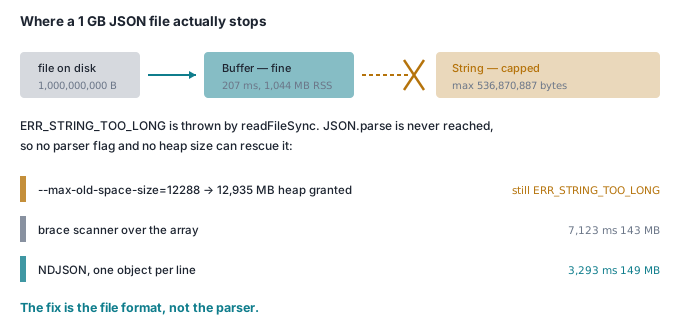
Reading 1 GB into memory is not the problem. Reading it into a string is:
readFileSync -> Buffer OK: 1000205253 bytes in 207 ms; rss 1044 MB
JSON.parse(buffer) -> ERR_STRING_TOO_LONG :: Cannot create a string longer than 0x1fffffe8 characters
buffer.toString()  -> ERR_STRING_TOO_LONG :: Cannot create a string longer than 0x1fffffe8 characters
The Buffer holds the entire gigabyte happily. JSON.parse(buffer) fails because its first act is to coerce the Buffer to a string — so dropping the 'utf8' argument, the most common suggestion on the internet, buys you exactly nothing.
How much memory does JSON.parse actually need?
Ten times the file on a small one, falling to three times on a large one, as Node's 43 MB baseline stops dominating. Medians of three runs at each size (five at 100 MB):
| file size | median time | peak RSS | RSS ÷ file | heap used after parse | heap ÷ file |
|---|---|---|---|---|---|
| 10.2 MB | 36 ms | 108 MB | 10.6x | 30 MB | 2.9x |
| 50.2 MB | 189 ms | 326 MB | 6.5x | 126 MB | 2.5x |
| 100.1 MB | 374 ms | 564 MB | 5.6x | 241 MB | 2.4x |
| 250.2 MB | 1,067 ms | 1,202 MB | 4.8x | 593 MB | 2.4x |
| 500.2 MB | 2,134 ms | 2,049 MB | 4.1x | 1,164 MB | 2.3x |
| 535.2 MB | 3,803 ms | 1,765 MB | 3.3x | 1,254 MB | 2.3x |
Read the last column first, because it is the stable one. The parsed object graph costs 2.3–2.4x the JSON text at every size. Peak RSS is higher and noisier because it also holds the source string, the read buffer, and whatever the collector has not yet reclaimed — the 535 MB row peaking lower than the 500 MB row is GC scheduling, not a saving, which is why RSS belongs in a range rather than a constant.
That 2.3x is a property of the records, not of JSON. Same 100 MB of text, four shapes (a separate run, so the order-record row lands a few MB off the table above — GC timing moves these by a percent or two):
| shape at 100 MB | records | heap used | heap ÷ file | peak RSS |
|---|---|---|---|---|
| long strings, 1 KB each | 100,000 | 210 MB | 2.09x | 522 MB |
| wide order records, 620 B each | 161,500 | 237 MB | 2.37x | 557 MB |
| flat array of numbers | 10,000,000 | 344 MB | 3.44x | 662 MB |
tiny objects {"a":1,"b":2} |
7,144,000 | 447 MB | 4.47x | 877 MB |
The cost is per object, not per byte. Seven million thirteen-byte objects cost 4.47x their text; a hundred thousand kilobyte strings cost 2.09x. If your file is millions of small records — a telemetry or event export — budget for the top of that range.
Does raising the heap limit help?
Not for the 1 GB file, and the flag is not being ignored:
--max-old-space-size |
heap actually granted | 1 GB file |
|---|---|---|
| unset (default) | 4,345 MB | ERR_STRING_TOO_LONG |
| 4096 | 4,345 MB | ERR_STRING_TOO_LONG |
| 8192 | 8,640 MB | ERR_STRING_TOO_LONG |
| 12288 | 12,935 MB | ERR_STRING_TOO_LONG |
Twelve gigabytes of heap on a 16 GB machine, and the identical error at the identical line. This is the measurement that should change how you debug this: if raising the heap does not help, you were never out of heap. A file over 512 MiB fails the same way on a laptop and on a 512 GB server.
The flag does matter below the wall, where it is the other limit. The 100 MB file, parsed whole, against a capped heap:
--max-old-space-size |
result | time |
|---|---|---|
| 128 | FATAL ERROR: Reached heap limit |
— |
| 160 | FATAL ERROR: Reached heap limit |
— |
| 192 | FATAL ERROR: Reached heap limit |
— |
| 224 | FATAL ERROR: Reached heap limit |
— |
| 256 | ok | 578 ms |
| 384 | ok | 468 ms |
| 512 | ok | 444 ms |
| 768 | ok | 400 ms |
| 1024 | ok | 364 ms |
A 100 MB file needs at least a 256 MB heap, and near that floor it runs 59% slower — 578 ms against 364 ms, all of it garbage collection. On a 16 GB laptop the string limit always bites first, because even the worst-shaped 512 MiB file needs about 2.4 GB against a 4.3 GB default heap. In a container with --max-old-space-size=1024 the heap bites first, at roughly 430 MB of wide records or 230 MB of tiny ones. Which error you get is a property of your deployment, not of your data.
Can you write a streaming parser for a JSON array?
Yes, and it is about twenty lines, because the common case is narrow: a top-level array of objects. Scan for balanced braces, respecting strings and escapes, and hand each complete object to JSON.parse on its own.
let buf = '', depth = 0, start = -1, inStr = false, esc = false, scanned = 0;
for await (const chunk of fs.createReadStream(file, { encoding: 'utf8', highWaterMark: 1 << 20 })) {
  buf += chunk;
  for (let i = scanned; i < buf.length; i++) {
    const c = buf.charCodeAt(i);
    if (inStr) { if (esc) esc = false; else if (c === 92) esc = true; else if (c === 34) inStr = false; continue; }
    if (c === 34) { inStr = true; continue; }
    if (c === 123) { if (depth === 0) start = i; depth++; continue; }              // {
    if (c === 125 && --depth === 0) { tally(JSON.parse(buf.slice(start, i + 1))); start = -1; }  // }
  }
  scanned = buf.length;                       // never re-scan a byte
  if (depth > 0) { buf = buf.slice(start); scanned -= start; start = 0; }
  else { buf = ''; scanned = 0; }
}
The scanned cursor is the part worth stealing, because the first version of this article's code did not have it. Without it the retained tail of an unfinished object is re-scanned on the next chunk, depth accumulates instead of returning to zero, and the buffer grows without bound. It did not crash. It reported 1,708 records instead of 161,500, in 19.3 seconds, having quietly skipped 99% of the file. That is why the checksum matters more than the timing.
Corrected, it agrees with JSON.parse exactly — and costs a little under half the throughput:
| 100 MB array | median time | range | throughput | peak RSS |
|---|---|---|---|---|
JSON.parse, whole file |
374 ms | 371–401 | 268 MB/s | 564 MB |
| streaming brace scanner | 727 ms | 724–745 | 138 MB/s | 127 MB |
1.9x slower, 4.4x less memory, and no ceiling. The same scanner reads the 1 GB file in 7.1 s (range 6.4–7.7) in 143 MB — memory is flat in file size, because at any moment it holds one object and one chunk. Cap the heap at 32 MB and it still finishes the 100 MB file in 698 ms, a run in which JSON.parse cannot get past 224 MB.
Two caveats. It handles only a top-level array of objects — an array of arrays, or records nested under a key, needs different scanning. And it validates nothing between records: a stray brace produces a JSON.parse failure on one record rather than a clear message about the file.
Is NDJSON actually better?
Yes, and by more than expected. This is where a measurement contradicted me: I assumed streaming would cost throughput in every form. For NDJSON — one object per line, no wrapping array, no commas — it does not. It is faster.
| 100 MB | median time | range | throughput | peak RSS |
|---|---|---|---|---|
JSON.parse, whole array |
374 ms | 371–401 | 268 MB/s | 564 MB |
| brace scanner over the array | 727 ms | 724–745 | 138 MB/s | 127 MB |
| NDJSON, split on newline | 335 ms | 329–356 | 299 MB/s | 127 MB |
NDJSON via node:readline |
385 ms | 382–389 | 260 MB/s | 78 MB |
And at 1 GB, where the first row does not exist at all:
| 1 GB | median time | range | throughput | peak RSS |
|---|---|---|---|---|
JSON.parse, whole array |
fails | — | — | ERR_STRING_TOO_LONG |
| brace scanner over the array | 7,123 ms | 6,420–7,674 | 140 MB/s | 143 MB |
| NDJSON, split on newline | 3,293 ms | 3,161–3,721 | 304 MB/s | 149 MB |
NDJSON via node:readline |
3,584 ms | 3,494–3,685 | 279 MB/s | 95 MB |
NDJSON is 2.2x faster than the brace scanner, holds a quarter of JSON.parse's memory at 100 MB, and does not grow that memory at 1 GB. It wins on all three axes at once, because finding a record boundary costs nothing: indexOf('\n') in optimised C++ against a JavaScript loop maintaining a state machine. The brace scanner does character-by-character work the format made unnecessary.
node:readline is 9% slower than splitting on newlines yourself but holds 95 MB against 149 MB at 1 GB, decoding one line at a time rather than a megabyte. If memory is why you are streaming, take readline and the 9%.
So the conclusion is not "write a better parser". It is change the format. Converting the 1 GB array to NDJSON with the brace scanner above took 8.6 s once (range 8.60–8.77, 127 MB peak RSS). Every read afterwards is 2.2x faster than scanning the array, and quicker per megabyte than JSON.parse managed on a file small enough for it. That trade — pay once at write time to make every read cheap and bounded — is the same one behind splitting documents on structure before you index them, and the same reason a framed binary protocol beats JSON over the wire: the win comes from the record boundary being explicit rather than discovered.
One more property earns the migration on its own. A truncated array file is unparseable in its entirety; a truncated NDJSON file is a valid NDJSON file missing its last line. You can head, wc -l, split and grep it, and resume an interrupted download at a line boundary.
So what should you actually do?
Under 200 MB: use JSON.parse and stop reading. It is 268 MB/s, it is one line, and the 1.2 GB of peak RSS measured at 250 MB is not a problem on a 16 GB machine. Every streaming parser here is slower and more code.
200 MB to 536,870,887 bytes: JSON.parse still works, but check your heap. It needs about 2.5x the file in old space and slows by roughly 60% near the cap. In a container with a fixed memory limit, this is the range where you get paged at 2am.
Over 536,870,887 bytes: two options, and only two. Stream the array with a brace scanner if you cannot change the producer — half the throughput, constant memory, and check it against a checksum before you trust it. Change the format to NDJSON if you can: faster than JSON.parse was, constant memory, and usable from the shell. If you generate the file yourself, there is no argument for the array form at all.
Do not bother with --max-old-space-size. Above the wall it changes nothing, and below it you are raising a ceiling that next month's file will hit again.
Check it yourself
One file, no dependencies, no network, about twelve seconds. It generates ~100 MB in both formats (191 MB in ./jsondemo-data), then runs each strategy three times in its own child process, so peak RSS is attributable.
node jsondemo.mjs
node 23.5.0 arm64 darwin
MAX_STRING_LENGTH = 536870888 bytes (512.00 MiB)
default heap limit = 4345 MB

generating ~100 MB of orders...
  jsondemo-data/orders.json  100059787 bytes, 161500 records
  jsondemo-data/orders.ndjson  100194104 bytes, 162000 records

strategy                             median ms   peak RSS   MB/s   records
JSON.parse, whole file                    386     550 MB    259    161500
JSON.parse, heap capped at 128 MB     FAILED -- FATAL ERROR: Reached heap limit Allocation failed - JavaScript heap out of memory
streaming brace scanner                   734     125 MB    136    161500
streaming, heap capped at 32 MB           751     118 MB    133    161500
NDJSON, line by line                      322     125 MB    311    162000
NDJSON, heap capped at 32 MB              384     118 MB    261    162000

what a file past the string limit does, reproduced in one line:
  Buffer.alloc(MAX_STRING_LENGTH + 1).toString() -> ERR_STRING_TOO_LONG: Cannot create a string longer than 0x1fffffe8 characters
  fs.readFileSync(f, "utf8") throws exactly this at 536,870,888 bytes,
  before JSON.parse is ever called. --max-old-space-size does not move it.
The last block is the point of the demo: it reproduces the 1 GB failure in one line, without a 1 GB file, because the limit was never about the file.
Then set TARGET to 600e6 and run it again. The first row stops existing, the last two do not change, and the whole decision fits on one screen.
// jsondemo.mjs -- how big a JSON file can JSON.parse actually take?
// node jsondemo.mjs   ->  generates ~100 MB in ./jsondemo-data, measures 6 runs
import fs from 'node:fs';
import { execFileSync } from 'node:child_process';
import buffer from 'node:buffer';
import v8 from 'node:v8';

const DIR = 'jsondemo-data';
const TARGET = 100e6;                       // keep it modest: ~100 MB
const ARR = `${DIR}/orders.json`;
const NDJ = `${DIR}/orders.ndjson`;

// ---------- a deterministic, realistically shaped record ----------
const rnd = (() => { let a = 20260831; return () => { a |= 0; a = (a + 0x6d2b79f5) | 0; let t = Math.imul(a ^ (a >>> 15), 1 | a); t = (t + Math.imul(t ^ (t >>> 7), 61 | t)) ^ t; return ((t ^ (t >>> 14)) >>> 0) / 4294967296; }; })();
const pick = (a) => a[Math.floor(rnd() * a.length)];
const pad = (n, w) => String(n).padStart(w, '0');
const hex = (n) => { let s = ''; for (let i = 0; i < n; i++) s += '0123456789abcdef'[Math.floor(rnd() * 16)]; return s; };
const FIRST = ['ada', 'grace', 'linus', 'alan', 'radia', 'ken', 'mei', 'ravi', 'lena', 'pablo'];
const LAST = ['lovelace', 'hopper', 'torvalds', 'turing', 'perlman', 'thompson', 'tanaka', 'patel', 'novak', 'ortega'];
const CITY = ['Hanoi', 'Singapore', 'Bangkok', 'Tokyo', 'London', 'Berlin', 'Madrid', 'Toronto', 'Austin', 'Seattle'];
const STATUS = ['pending', 'paid', 'packed', 'shipped', 'delivered', 'refunded'];
const NOUN = ['kettle', 'lamp', 'desk', 'shelf', 'headset', 'mug', 'stool', 'speaker'];
const UA = ['Mozilla/5.0 (Macintosh; Intel Mac OS X 10_15_7)', 'Mozilla/5.0 (Windows NT 10.0; Win64; x64)', 'Mozilla/5.0 (iPhone; CPU iPhone OS 17_0 like Mac OS X)'];

const order = (i) => ({
  id: `${hex(8)}-${hex(4)}-${hex(4)}-${hex(4)}-${hex(12)}`,
  order_number: `ORD-${pad(100000 + i, 8)}`,
  status: pick(STATUS),
  created_at: new Date(Date.UTC(2025, 0, 1) + Math.floor(rnd() * 3e10)).toISOString(),
  customer: { email: `${pick(FIRST)}.${pick(LAST)}${Math.floor(rnd() * 900)}@example.com`, city: pick(CITY), segment: rnd() > 0.7 ? 'vip' : 'returning', user_agent: pick(UA) },
  lines: Array.from({ length: 1 + Math.floor(rnd() * 4) }, (_, k) => ({
    line_id: `ln_${pad(i, 7)}_${k}`, sku: `SKU-${pad(Math.floor(rnd() * 99999), 5)}`,
    name: pick(NOUN), quantity: 1 + Math.floor(rnd() * 5),
    unit_price: Math.round(rnd() * 24000) / 100, fulfilled: rnd() > 0.3
  })),
  totals: { currency: 'USD', grand_total: Math.round(rnd() * 90000) / 100 }
});

async function generate() {
  fs.mkdirSync(DIR, { recursive: true });
  for (const [file, mode] of [[ARR, 'array'], [NDJ, 'ndjson']]) {
    const ws = fs.createWriteStream(file);
    let written = 0, n = 0;
    const write = (s) => { written += Buffer.byteLength(s); return ws.write(s); };
    if (mode === 'array') write('[\n');
    while (written < TARGET) {
      const batch = [];
      for (let k = 0; k < 500; k++) {
        batch.push((n === 0 ? '' : mode === 'array' ? ',\n' : '\n') + JSON.stringify(order(n)));
        n++;
      }
      if (!write(batch.join(''))) await new Promise((r) => ws.once('drain', r));
    }
    write(mode === 'array' ? '\n]\n' : '\n');
    await new Promise((r) => ws.end(r));
    console.log(`  ${file}  ${fs.statSync(file).size} bytes, ${n} records`);
  }
}

// ---------- the strategies. all three compute the same checksum ----------
let count = 0, revenue = 0;
const tally = (r) => { count++; revenue += r.totals.grand_total; };

async function whole(file) {
  for (const r of JSON.parse(fs.readFileSync(file, 'utf8'))) tally(r);
}

// Incremental parser for the common case: a top-level array of objects.
// Scan for balanced braces, respecting strings and escapes; JSON.parse each
// complete object on its own. Never re-scan a byte -- that is the bug that
// makes the naive version quadratic and silently wrong.
async function streamArray(file) {
  let buf = '', depth = 0, start = -1, inStr = false, esc = false, scanned = 0;
  for await (const chunk of fs.createReadStream(file, { encoding: 'utf8', highWaterMark: 1 << 20 })) {
    buf += chunk;
    for (let i = scanned; i < buf.length; i++) {
      const c = buf.charCodeAt(i);
      if (inStr) { if (esc) esc = false; else if (c === 92) esc = true; else if (c === 34) inStr = false; continue; }
      if (c === 34) { inStr = true; continue; }
      if (c === 123) { if (depth === 0) start = i; depth++; continue; }          // {
      if (c === 125 && --depth === 0) { tally(JSON.parse(buf.slice(start, i + 1))); start = -1; }  // }
    }
    scanned = buf.length;
    if (depth > 0) { buf = buf.slice(start); scanned -= start; start = 0; }
    else { buf = ''; scanned = 0; }
  }
}

async function ndjson(file) {
  let tail = '';
  for await (const chunk of fs.createReadStream(file, { encoding: 'utf8', highWaterMark: 1 << 20 })) {
    const lines = (tail + chunk).split('\n');
    tail = lines.pop();
    for (const line of lines) if (line) tally(JSON.parse(line));
  }
  if (tail.trim()) tally(JSON.parse(tail));
}

const MODES = { whole, stream: streamArray, ndjson };

// ---------- child: run one strategy, report time and peak RSS ----------
if (process.argv[2] && MODES[process.argv[2]]) {
  const mode = process.argv[2], file = process.argv[3];
  const t0 = process.hrtime.bigint();
  try {
    await MODES[mode](file);
    const ms = Number(process.hrtime.bigint() - t0) / 1e6;
    console.log(JSON.stringify({ ok: true, ms, peak_rss_mb: process.resourceUsage().maxRSS / 1e3, count, revenue: Math.round(revenue) }));
  } catch (e) {
    console.log(JSON.stringify({ ok: false, err: `${e.code || e.constructor.name}: ${e.message}` }));
  }
  process.exit(0);
}

// ---------- parent: generate, then run each strategy in its own process ----------
console.log(`node ${process.versions.node} ${process.arch} ${process.platform}`);
console.log(`MAX_STRING_LENGTH = ${buffer.constants.MAX_STRING_LENGTH} bytes (${(buffer.constants.MAX_STRING_LENGTH / 1024 / 1024).toFixed(2)} MiB)`);
console.log(`default heap limit = ${(v8.getHeapStatistics().heap_size_limit / 1e6).toFixed(0)} MB\n`);

if (!fs.existsSync(ARR)) { console.log('generating ~100 MB of orders...'); await generate(); }
else console.log('reusing existing files in ' + DIR);

const run = (args) => {
  // stdio must be piped: a heap OOM prints 200 lines of native stack trace
  const opts = { encoding: 'utf8', stdio: ['ignore', 'pipe', 'pipe'] };
  try { return JSON.parse(execFileSync(process.execPath, [...args], opts).trim().split('\n').pop()); }
  catch (e) { return { ok: false, err: (e.stderr || '').split('\n').find((l) => /Error|FATAL/.test(l)) || 'crashed' }; }
};

const CASES = [
  ['JSON.parse, whole file', [], 'whole', ARR],
  ['JSON.parse, heap capped at 128 MB', ['--max-old-space-size=128'], 'whole', ARR],
  ['streaming brace scanner', [], 'stream', ARR],
  ['streaming, heap capped at 32 MB', ['--max-old-space-size=32'], 'stream', ARR],
  ['NDJSON, line by line', [], 'ndjson', NDJ],
  ['NDJSON, heap capped at 32 MB', ['--max-old-space-size=32'], 'ndjson', NDJ]
];

console.log('\nstrategy                             median ms   peak RSS   MB/s   records');
for (const [label, flags, mode, file] of CASES) {
  const size = fs.statSync(file).size;
  const runs = [run([...flags, process.argv[1], mode, file]), run([...flags, process.argv[1], mode, file]), run([...flags, process.argv[1], mode, file])];
  if (!runs[0].ok) { console.log(label.padEnd(36) + '  FAILED -- ' + runs[0].err); continue; }
  const ms = runs.map((r) => r.ms).sort((a, b) => a - b)[1];
  const rss = Math.max(...runs.map((r) => r.peak_rss_mb));
  console.log(label.padEnd(36) + ms.toFixed(0).padStart(9) + (rss.toFixed(0) + ' MB').padStart(11) +
    ((size / 1e6) / (ms / 1000)).toFixed(0).padStart(7) + String(runs[0].count).padStart(10));
}

// The 1 GB failure, without needing a 1 GB file: the limit is on the STRING.
console.log('\nwhat a file past the string limit does, reproduced in one line:');
try { Buffer.alloc(buffer.constants.MAX_STRING_LENGTH + 1, 0x20).toString('utf8'); }
catch (e) { console.log(`  Buffer.alloc(MAX_STRING_LENGTH + 1).toString() -> ${e.code}: ${e.message}`); }
console.log('  fs.readFileSync(f, "utf8") throws exactly this at 536,870,888 bytes,');
console.log('  before JSON.parse is ever called. --max-old-space-size does not move it.');
Delete jsondemo-data when you are done; it is 191 MB.