Why does text copied from a PDF come out scrambled?
A PDF page has no paragraphs, no sentences and often no spaces — it has draw-glyph-here instructions. Sorting those by position, the obvious extraction algorithm, put 0 of 23 consecutive sentence pairs next to each other on our two-column test page. macOS PDFKit got 23 of 23, then broke a letter-spa
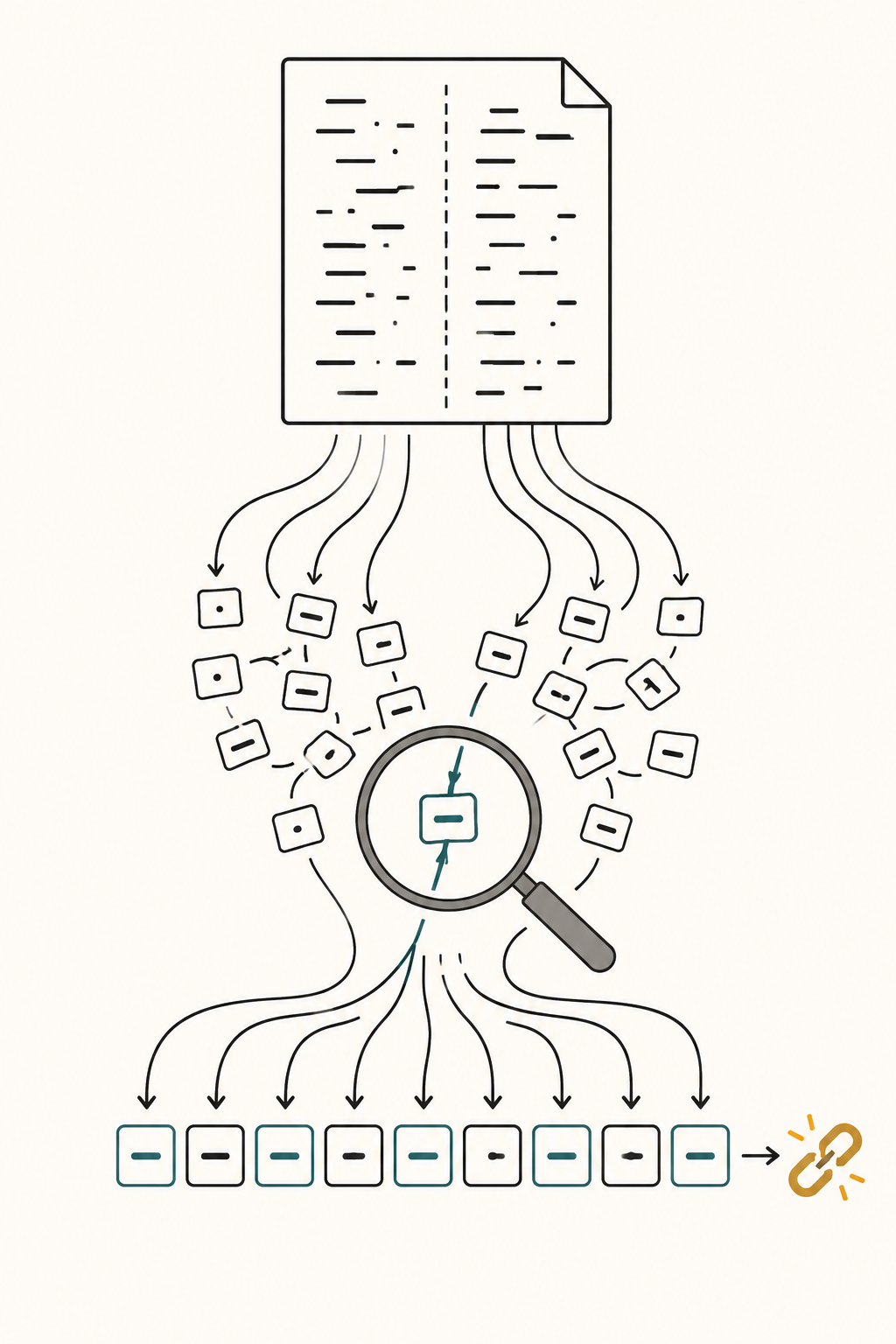
A PDF page contains no paragraphs, no sentences and frequently no space characters — only instructions to draw glyphs at coordinates, and on our two-column test page sorting those glyph runs by position put 0 of 23 consecutive sentence pairs next to each other. Everything an extractor gives you above the level of a single glyph is a reconstruction.
Measured on an Apple M3, 16 GB, macOS 26.4.1, arm64, with Python 3.14.6, Swift 6.3.1 against the system PDFKit, and tesseract 5.5.0. We wrote the PDFs ourselves, byte by byte. pdftotext, qpdf, mutool, Ghostscript, pypdf, pdfminer, reportlab and pyobjc/Quartz are all absent from this machine, so nothing here describes Poppler or PyMuPDF.
The short answer
- A PDF page is a content stream of operators. Our one-column page decompresses to 761 bytes holding 8
Tjand 8Tmoperators, and/Paragraph,/Sentence,/Wordand/StructTreeRootappear zero times in the file. - Reading order is inferred, and the two obvious rules disagree. Sorting runs by y-then-x scored 0/23 on a two-column page; content-stream order scored 23/23. On a page whose lines are drawn backwards the scores flip exactly: 3/3 for the y-sort, 0/3 for draw order.
- Word spaces are a threshold, not data. Our spacing page holds one space character in its whole 379-byte content stream for 15 words. Sweeping the gap threshold 0.05–0.30 em, no value gets all three lines right: below 0.180 em a letter-spaced heading becomes 20 "words"; at 0.190 em and above
hello world againbecomeshelloworldagain. - A ligature only breaks search when the font hides it. With the glyph named
/fi, PDFKit returned plainfind. With a subset font using glyph name/g212and noToUnicode, it returnedÔnd, and searches for "find", "file" and "flag" all failed. - An image-only page yields exactly 0 characters —
chars=0, images=1againstchars=448, images=0for the same page as text. Extraction ran at 941.6 pages/s; tesseract on that page took 226 ms, 213x slower.
How were these PDFs made?
With a 120-line Python script that emits PDF objects and FlateDecode content streams directly. No PDF library is involved, because a library would put its own opinion about spacing between us and the bytes.
Twelve files: one column; two columns at 71.9 pt and 37.9 pt gutters, the second with the right column's baselines offset 8 pt; a table, and the same table with three cells blanked; a letter-spaced heading over tight-set body text, and the same page with the letter-spacing never reset; three ligature encodings; a page drawn in reverse; and a 40-page document of 45 lines each. The largest is 26,062 bytes.
Two extractors read them back: macOS PDFKit via a small Swift program — the engine Preview and Spotlight use, and mdimport -t -d3 returned byte-identical text — and a 150-line from-scratch Python extractor that parses the content stream, tracks the text matrix and emits (x, y, string) runs. The second exists so we can turn the knobs.
Does a PDF contain words at all?
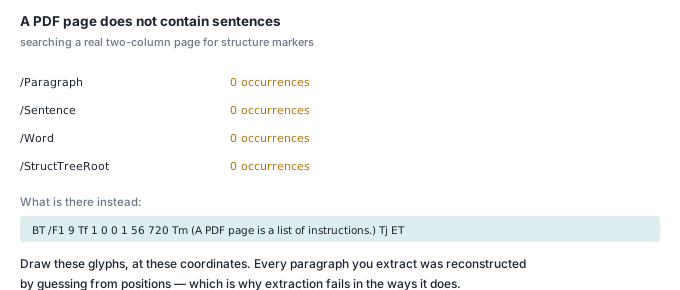
Here is the decompressed content stream of the two-column page, unedited:
BT /F1 9 Tf 1 0 0 1 56 720 Tm (S01 A PDF page is a list of drawing instructions.) Tj ET
BT /F1 9 Tf 1 0 0 1 56 704 Tm (S02 Each instruction places glyphs at a point.) Tj ET
BT /F1 9 Tf 1 0 0 1 56 688 Tm (S03 There is no paragraph object in the file.) Tj ET
...
BT /F1 9 Tf 1 0 0 1 320 720 Tm (S13 A two column layout breaks the y sort.) Tj ET
BT begins a text object, Tf selects a font and size, Tm sets the text matrix — here a translation to (56, 720), in points from the bottom-left corner — Tj paints the string, ET ends it. That is the entire vocabulary.
Note what is not there. Nothing says line 1 and line 2 share a paragraph, or that the run at x=56 and the run at x=320 are different columns. Nothing even fixes their order: a renderer may execute the commands however it likes so long as the ink lands in the right place. A PDF describes a picture that happens to be made of letters.
Why do two columns interleave?
Because the obvious algorithm is "sort by y descending, then x ascending", and in two columns the first line of each column shares a y. Each method scored on how many of the 23 consecutive sentence pairs (S01→S02, S02→S03, …) came out adjacent:
| Page | PDFKit | naive y-sort | naive draw-order |
|---|---|---|---|
| two columns, 71.9 pt gutter | 23/23 | 0/23 | 23/23 |
| two columns, 37.9 pt gutter, staggered baselines | 23/23 | 0/23 | 23/23 |
| single column, lines drawn in reverse | 3/3 | 3/3 | 0/3 |
The y-sort output starts S01 S13 S02 S14 S03 S15 — a perfect zip, not one pair surviving. "0/23" is worse than random, and every sentence in it is still grammatical, which is why nobody notices until an answer is wrong.
The result that surprised us was PDFKit's. We expected to demonstrate column interleaving with a real extractor and could not. It survived both fixtures, so we swept a third page with shorter lines, walking the right column's x inwards from 320 pt: PDFKit held 23/23 at gutters of 137.4, 97.4, 57.4, 37.4, 27.4, 17.4 and 7.4 pt, and collapsed to 0/23 only at -2.6 pt, where the columns physically overlap. We never found a gutter that merely confuses it. If your pipeline shells out to a mature extractor, this failure may not be yours; if it sorts runs itself, it is.
The last row of the table is the other half of the point: draw order and position order are both defensible rules, and each scores zero where the other scores full marks. There is no third source of truth in the file.
Where do the word spaces come from?
Often from nowhere. Here is a justified line as we wrote it:
BT /F1 11 Tf 1 0 0 1 72 700 Tm [(the) -180 (invoice) -180 (total) -180 (must)
  -180 (match) -180 (the) -180 (purchase) -180 (order) -180 (line) -180 ] TJ ET
TJ takes an array of strings and numbers; each number is subtracted from the pen position in thousandths of an em, so -180 opens a gap of 0.180 em before the next string. There is no space character in it. The page's whole 379-byte content stream contains one space, inside the heading, for 15 words. Every space you see when you copy that line out was invented by the extractor, by measuring gaps.
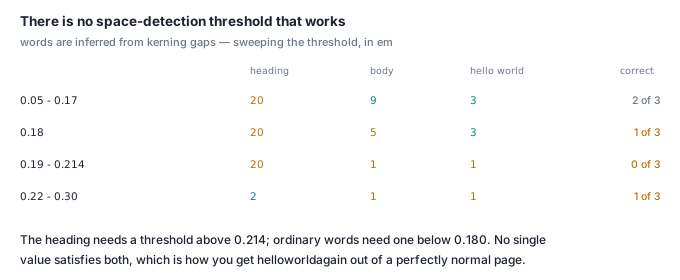
So the rule is: if the gap between two glyphs exceeds k ems, emit a space. Sweeping k on a page carrying a 3 Tc heading (0.214 em between letters), a TJ line with 0.180 em word gaps, and three words placed by separate Tm with 0.182 em gaps:
| k (em) | heading "words" (want 2) | body words (want 9) | hello world again (want 3) |
lines exactly right |
|---|---|---|---|---|
| 0.050 – 0.170 | 20 | 9 | 3 | 2 / 3 |
| 0.180 | 20 | 5 | 3 | 1 / 3 |
| 0.190 – 0.214 | 20 | 1 | 1 | 0 / 3 |
| 0.220 – 0.300 | 2 | 1 | 1 | 1 / 3 |
No threshold works. The heading needs k above 0.214; the words need k below 0.180. The interval is empty, on one page, in one font. At k=0.19 the third line comes out 'helloworldagain'; at k=0.10 it comes out 'hello world again' and the heading comes out P R O D U C T S P E C I F I C A T I O N. PDFKit lands on that first row exactly — not a bug so much as the only available trade.
Tc is graphics state, not text-object state, so it survives ET. A page that sets 3 Tc for a heading and never resets it extracts its next body line as 44 "words" instead of 9 — t h e i n v o i c e t o t a l …. We hit this by accident while building the fixture, which is good evidence that real generators do too. If a document arrives with an absurd token count, look for an unreset Tc before blaming the extractor.
Do ligatures break search?
Only when the font refuses to say what the glyph is. Three encodings of the same sentence, all rendering identically:
| Font encoding | Extracted | "find" matches | "flag" matches |
|---|---|---|---|
/Differences [1 /fi 2 /fl], no ToUnicode |
We could not find the file or the flag. |
yes | yes |
same, plus ToUnicode mapping <01> → U+FB01 |
We could not find the file or the flag. |
yes | yes |
subset font, /Differences [1 /g212 2 /g215], no ToUnicode |
We could not Ônd the Ôle or the ×ag. |
no | no |
The second row is another expectation we got wrong. We built it specifically to emit U+FB01 and break search, and PDFKit ignored our ToUnicode map in favour of the glyph name, returning U+0066 U+0069. Extractors that honour ToUnicode first will return U+FB01, and then "find" in text is false. We checked the repair on the literal string: with U+FB01 present, 'find' in s is False and 'find' in unicodedata.normalize('NFKC', s) is True, and NFKC leaves an already-decomposed line byte-identical.
Row three is the one you cannot repair. A subsetted font with meaningless glyph names and no ToUnicode gives the extractor nothing: code 1 falls through to WinAnsi and becomes Ô (U+00D4). The text is legible on screen and unsearchable in your index. CoreGraphics logged CoreGraphics PDF has logged an error to stderr on that file — worth catching, because it is the only warning you get. It is the same failure as in why search misses: document and query spelled differently at the codepoint level.
What happens to a table?
Better than expected, worse than it looks. All 20 of 20 cells appeared, in the right rows, as 6 lines — with 0 tab characters and 0 pipes. The column boundaries are gone. Row 2 extracts as 'Ibuprofen 10 mg/kg 6-8 h 30 mg/kg', and in 4 of 4 rows two different quantities share the unit mg/kg with nothing to say which is the single dose and which the daily maximum.
Then we blanked one cell in each of three rows — an ordinary table with gaps:
Drug Dose Interval Max 24h
Paracetamol 15 mg/kg 4-6 h 60 mg/kg
Ibuprofen 6-8 h 30 mg/kg
Amoxicillin 25 mg/kg 75 mg/kg
Azithromycin 10 mg/kg 24 h
The blank cells vanish without a trace. Any code reading columns by position now reports Ibuprofen's dose as 6-8 h — a duration in a dose field, on a paediatric dosing table. 1 of 4 rows is silently, confidently wrong; 3 of 4 lost a cell. That is the difference between text that is unstructured and text that is incorrect, and why table regions want a geometry-aware reader and structure-first chunking, which we measured in chunking a document without destroying its meaning.
How do you detect a scanned page?
We rasterised the one-column page at 150 dpi with CoreGraphics (1275 × 1650 px) and drew the bitmap into a fresh PDF — what a scanner produces. PDFKit returns 0 bytes of text from it. The check a pipeline needs is two cheap numbers per page:
| Page | extractable chars | image XObjects | bytes/page |
|---|---|---|---|
| text, one column | 448 | 0 | 1,277 |
| table | 184 | 0 | 1,180 |
| rasterised scan | 0 | 1 | 41,938 |
chars == 0 && images >= 1 is unambiguous; the 33x byte-size ratio is a secondary signal, not a decision. Our detector walks the page's /Resources /XObject dictionary for /Subtype /Image — 133.2 ms per call over the 40-page document including process startup, against 45.8 ms for a one-page call, so about 2.2 ms per page marginal.
Tesseract 5.5.0 then took 226 ms per page (2.26 s for 10 runs of the same 150 dpi page) against 1.06 ms per page for PDFKit: 213x more expensive. It scored 100.00% character accuracy against the original text layer, but that is a synthetic render of clean Helvetica — the ceiling, not a planning number. Trust the 226 ms, not the accuracy.
How fast is extraction?
On the 40-page, 1,800-line document (113,911 characters), over 20 repetitions, reopening the file each time:
| Extractor | ms per 40-page doc | pages/s |
|---|---|---|
| macOS PDFKit (Swift) | 42.48 | 941.6 |
| our 150-line Python parser | 40.1 | 997.4 |
The Python parser being marginally faster is not a claim that it is better: it does far less work, on pages with no fonts to load beyond base-14 and no layout analysis to perform. The order of magnitude is the point. Text extraction is ~1 ms/page, OCR is ~226 ms/page, so the image-only check decides your pipeline's cost, not the extractor you pick.
Extracted text still has to be split into units, and PDF output is exactly what breaks naive splitters: line breaks mid-sentence, headings with no terminal punctuation, list items with no full stop. We measured that in why splitting text into sentences is so hard.
Check it yourself
Builds a two-column PDF from raw bytes, prints its content stream, and reads it back two ways. Python 3, plus Swift with PDFKit for the second reader. Ran in under two seconds here.
#!/usr/bin/env python3
import re, zlib, subprocess

L = [f"S{i:02d} left column line number {i}."  for i in range(1, 13)]
R = [f"S{i:02d} right column line number {i}." for i in range(13, 25)]
body = b""
for i, s in enumerate(L):
    body += f"BT /F1 9 Tf 1 0 0 1 56 {720-16*i} Tm ({s}) Tj ET\n".encode()
for i, s in enumerate(R):
    body += f"BT /F1 9 Tf 1 0 0 1 320 {720-16*i} Tm ({s}) Tj ET\n".encode()
z = zlib.compress(body, 9)

objs = [
 b"<< /Type /Catalog /Pages 2 0 R >>",
 b"<< /Type /Pages /Count 1 /Kids [4 0 R] >>",
 b"<< /Type /Font /Subtype /Type1 /BaseFont /Helvetica /Encoding /WinAnsiEncoding >>",
 b"<< /Type /Page /Parent 2 0 R /MediaBox [0 0 612 792] "
 b"/Resources << /Font << /F1 3 0 R >> >> /Contents 5 0 R >>",
 b"<< /Filter /FlateDecode /Length " + str(len(z)).encode()
 + b" >>\nstream\n" + z + b"\nendstream",
]
out, offs = bytearray(b"%PDF-1.7\n"), []
for i, o in enumerate(objs, 1):
    offs.append(len(out)); out += f"{i} 0 obj\n".encode() + o + b"\nendobj\n"
x = len(out)
out += f"xref\n0 {len(objs)+1}\n0000000000 65535 f \n".encode()
for o in offs: out += f"{o:010d} 00000 n \n".encode()
out += f"trailer\n<< /Size {len(objs)+1} /Root 1 0 R >>\nstartxref\n{x}\n%%EOF\n".encode()
open("two-column.pdf", "wb").write(out)
print(f"wrote two-column.pdf, {len(out)} bytes\n")
print("--- raw content stream: positioned glyphs, no paragraphs ---")
print(body.decode()[:260], "...\n")

def adjacency(text):
    seq, seen = [], set()
    for n in (int(m) for m in re.findall(r"S(\d\d)", text)):
        if n not in seen: seen.add(n); seq.append(n)
    return sum(1 for a, b in zip(seq, seq[1:]) if b == a + 1), seq

runs = [(float(m[1]), float(m[0]), m[2]) for m in
        re.findall(r"1 0 0 1 (\d+) (\d+) Tm \((.*?)\) Tj", body.decode())]
naive = " ".join(t for _, _, t in sorted(runs, key=lambda r: (-r[0], r[1])))
adj, seq = adjacency(naive)
print(f"naive y-sort: {adj}/23 pairs adjacent   order starts {seq[:6]}")

open("x.swift", "w").write('''import PDFKit
let d = PDFDocument(url: URL(fileURLWithPath: CommandLine.arguments[1]))!
print((0..<d.pageCount).map { d.page(at: $0)!.string ?? "" }.joined())''')
try:
    t = subprocess.run(["swift", "x.swift", "two-column.pdf"],
                       capture_output=True, text=True, timeout=180).stdout
    adj, seq = adjacency(t)
    print(f"macOS PDFKit: {adj}/23 pairs adjacent   order starts {seq[:6]}")
except Exception as e:
    print("PDFKit unavailable:", e)
Our run:
wrote two-column.pdf, 863 bytes

--- raw content stream: positioned glyphs, no paragraphs ---
BT /F1 9 Tf 1 0 0 1 56 720 Tm (S01 left column line number 1.) Tj ET
BT /F1 9 Tf 1 0 0 1 56 704 Tm (S02 left column line number 2.) Tj ET
...

naive y-sort: 0/23 pairs adjacent   order starts [1, 13, 2, 14, 3, 15]
macOS PDFKit: 23/23 pairs adjacent   order starts [1, 2, 3, 4, 5, 6]
Change the right column's x from 320 to 190 and PDFKit still returns 23/23; at 180 the columns overlap and it drops to 0/23. That boundary is not a setting and not a standard — it is an emergent property of somebody's heuristic, and it is what your document pipeline is standing on.