Moving a file to a server when all you have is a password prompt
No git remote, no scp, no keys — just a command channel. Base64 in chunks works, but two silent failures will corrupt the file first: protected /tmp writes, and a pty rewriting your bytes.
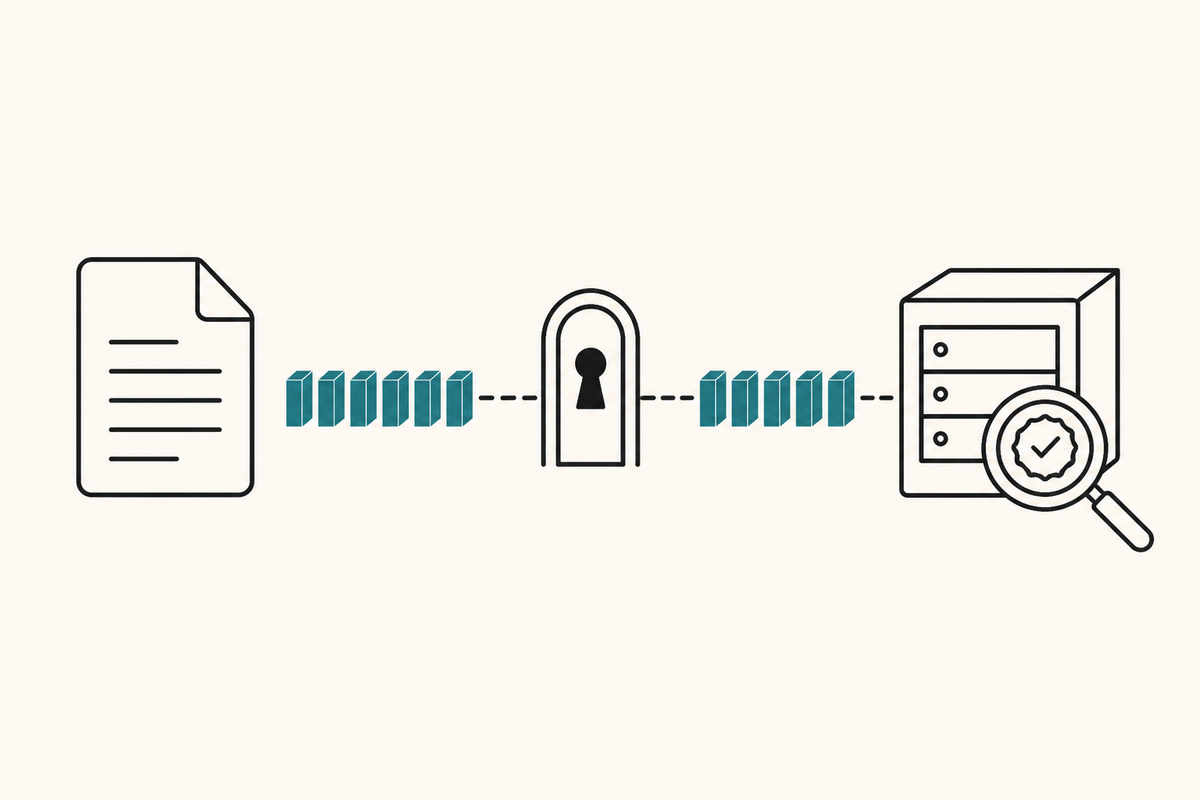
Encode the file as base64, split it into chunks, append each one over the command channel you already have, then verify a sha256 on both ends. The transfer is the easy part. The two failures that corrupt it silently are what this article is actually about — neither produces an error at the time.
The situation
A production box with no git remote and no CI. Access is ssh with a password, driven by an expect script, because keys were on the to-do list and had not happened yet. No scp, no rsync, no shared object storage.
So there is exactly one primitive: run this command over there, and see what it prints. A file has to become a sequence of commands.
The transfer
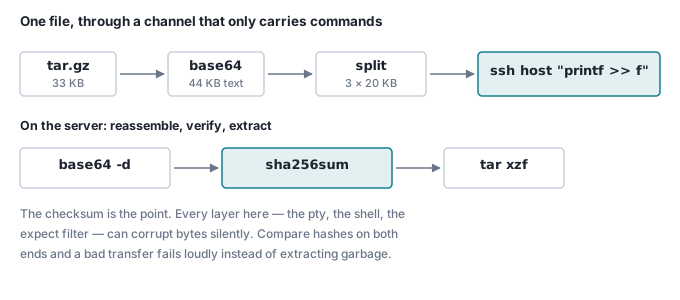
Base64 turns arbitrary bytes into something a shell will pass through unharmed. Chunking keeps each command well under ARG_MAX.
# Local: pack, encode, split into 20 KB pieces
tar czf /tmp/src.tgz --exclude=node_modules --exclude=.git .
LOCAL_SHA=$(shasum -a 256 /tmp/src.tgz | cut -d' ' -f1)
base64 < /tmp/src.tgz | tr -d '\n' > /tmp/src.b64
split -b 20000 /tmp/src.b64 /tmp/part_

# Ship each chunk as one command that appends to a file on the server
for f in /tmp/part_*; do
  ssh_run "printf %s '$(cat "$f")' >> /home/ubuntu/app/upload.b64"
done
On the far side, reassemble — and refuse to continue if the bytes changed:
base64 -d < upload.b64 > upload.tgz
if [ "$(sha256sum upload.tgz | cut -d' ' -f1)" != "$LOCAL_SHA" ]; then
  echo "CHECKSUM MISMATCH — upload corrupted, aborting"; exit 1
fi
tar xzf upload.tgz -C repo
printf %s rather than echo, because echo mangles backslashes on some shells. tr -d '\n' so the base64 is one long line and split can cut it anywhere without inventing line breaks.
That is the whole design, and it works. Then it does not.
Trap 1: root cannot write your file in /tmp
The staging file went to /tmp, the natural place for it. The remote script ran under sudo. It failed with:
/tmp/deploy.sh: line 2: /tmp/upload.tgz: Permission denied
Root. Permission denied. In a world-writable directory.
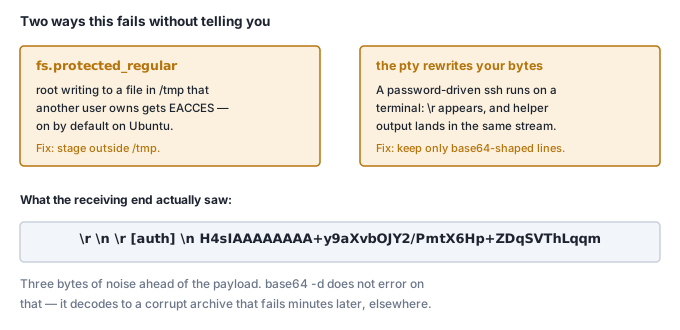
The cause is fs.protected_regular, a kernel hardening flag that has been on by default in Ubuntu for years. In a sticky world-writable directory like /tmp, it stops a process from opening another user's file for writing — including root. It exists to kill a classic attack where an unprivileged user pre-creates a file that a privileged process is about to write to.
Check it:
sysctl fs.protected_regular # fs.protected_regular = 2
Any non-zero value is on. 1 covers world-writable sticky directories; 2 extends it to group-writable ones. Ubuntu 26.04 ships 2.
The earlier steps had created /tmp/upload.tgz as ubuntu. The later step ran as root. Same path, different user, EACCES.
The fix is not to turn the flag off. It is to stop staging in /tmp:
# Stage inside the app directory, owned by the user doing the work.
REMOTE=/home/ubuntu/apps/myapp
ssh_run "mkdir -p $REMOTE && rm -f $REMOTE/upload.b64"
and to use sudo only for the commands that genuinely need it — docker, not tar.
Trap 2: the terminal rewrites your bytes
Pulling a database dump back was worse, because it failed quietly.
Password-driven ssh needs a pty. A pty is a terminal, and terminals do things to bytes: they translate line endings. Anything else the helper prints — in our case an [auth] marker from the login wrapper — arrives in the same stream as your payload.
What the decoder actually received:
\r \n \r [auth] \n H4sIAAAAAAAA+y9aXvbOJY2/PmtX6Hp+ZDqSVThLqqm...
Three bytes of noise, then a marker line, then the data. And base64 -d does not object. It skips what it cannot use, decodes the rest, and hands back an archive that is subtly wrong. The failure surfaces minutes later, somewhere else, looking like a corrupt tarball.
The instinct is tr -d '\n'. That is not enough — it leaves the \r, so the line \r[auth] never matches a ^\[auth\]$ filter and rides along into the decoder.
Strip carriage returns first, then keep only lines that look like base64:
ssh_run "base64 -w0 < $REMOTE/dump.sql.gz" \
  | tr -d '\r' \
  | grep -E '^[A-Za-z0-9+/=]+$' \
  | tr -d '\n' \
  | base64 -d > dump.sql.gz
Then check the result is actually a file, not a hopeful sequence of bytes:
if gzip -t dump.sql.gz 2>/dev/null; then
  echo "verified"
else
  echo "transfer corrupted — the copy on the server is still fine"
  rm -f dump.sql.gz
  exit 1
fi
Allow-list, do not deny-list. You cannot enumerate everything that might appear in that stream — a MOTD, a broker warning, a sudo lecture. You can say precisely what base64 looks like.
Check it yourself
The /tmp trap, in about thirty seconds on any Linux box:
sysctl fs.protected_regular          # expect: = 1

# as your normal user
echo hello > /tmp/victim.txt

# as root — same path, different owner
sudo sh -c 'echo overwrite > /tmp/victim.txt'
# sh: 1: cannot create /tmp/victim.txt: Permission denied
Root, refused, in a directory with 777 permissions. Now do the same in a directory you own and it succeeds. That single behaviour explains a whole class of "but it works when I run it manually" deploy failures.
What I would do differently
Use SSH keys. All of this exists because access was password-only, and every part of it — the pty, the expect wrapper, the marker leaking into the stream — follows from that one shortcut. With a key you get scp, rsync and ssh-agent, and none of the above is a problem you have.
The transfer above is a good bridge, and it is a bad destination. Ours is on the list to replace, honestly, right after the things that were louder.
What earns its place regardless
Two habits from this are worth keeping even with keys:
- Checksum every transfer.
rsyncverifies; a pipe you built does not. The comparison costs one line and turns a silent corruption into a loud stop. - Verify the file is what it claims.
gzip -t,tar -t,sha256sum— something that fails at the door rather than three steps later.
Where this goes next
This ships the Game Asset Generator and the site you are reading, both onto a box with no CI. If you would rather not build any of this, that is the argument for shipping software as a Docker image: the customer pulls it, and nobody hand-rolls a transport.
Earlier in this series: a job queue in Postgres and how a worker authenticates.