Should a game ship its audio as OGG, MP3 or AAC?
We encoded one exact-length music loop and ten sound effects every common way. Size barely separated the formats. Loop length did, and it depended on the decoder as much as the codec.
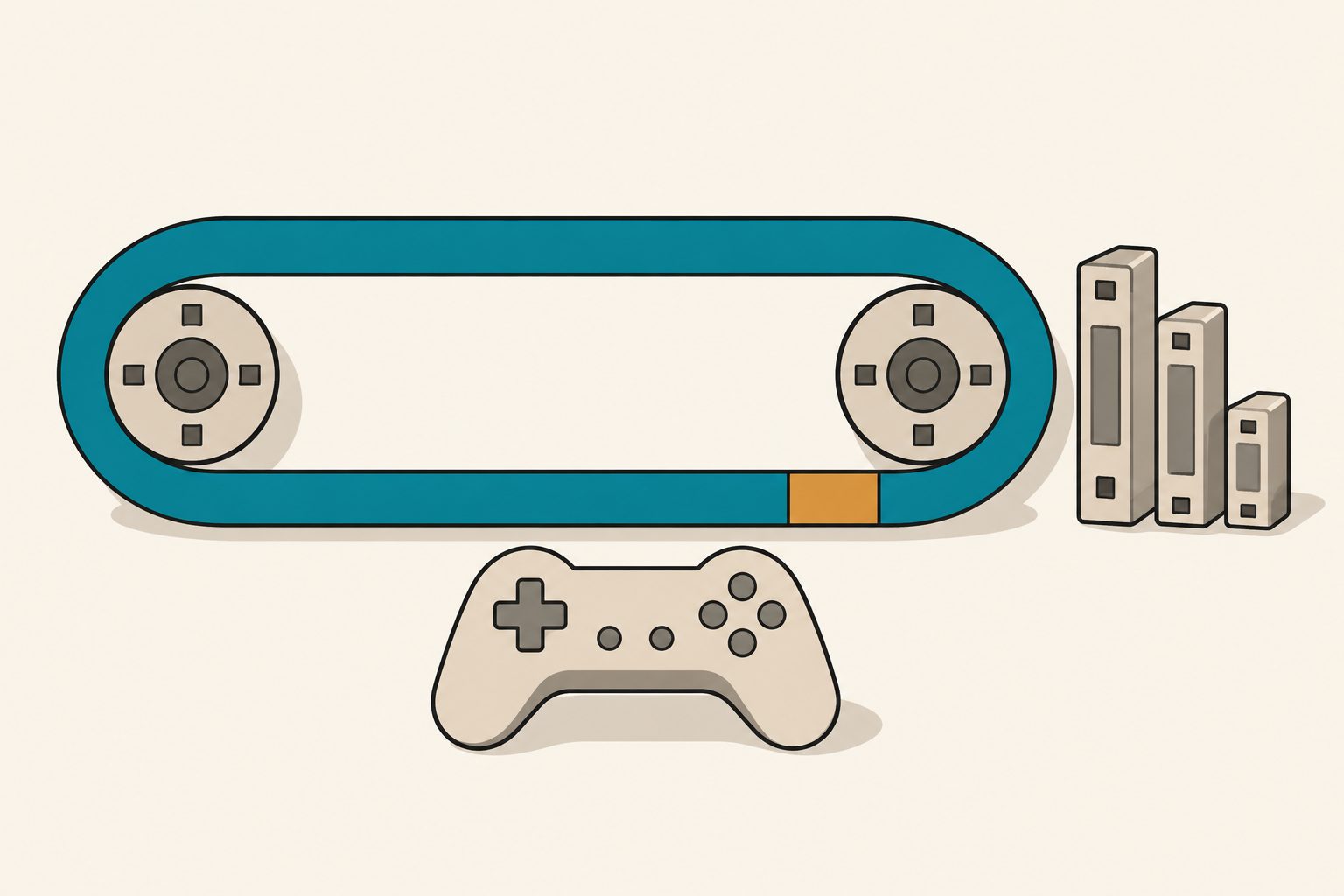
Ship Ogg (Vorbis or Opus) for loops: both decoded our 60-second loop back to exactly 2,880,000 samples, while AAC came back 448 to 1,536 samples long, a 9 to 32 ms hole at every repeat. MP3 is fine for loops too, but only while its LAME header survives. Strip it and the same file decodes 1,152 samples long, a 24 ms gap. Size settles less than the forum threads suggest. On ten short sound effects, the fixed header Vorbis puts in every file outweighed its compression advantage, and Opus came out smallest.
- Loop length is a decoder property, not just a codec property. The same
.m4adecoded to 2,880,000 samples in Apple's CoreAudio and 2,880,512 in ffmpeg 7.1.1. - Vorbis q3 made the smallest music file: 376,219 bytes for 60 s, against 960,768 for MP3 at 128 kbit/s.
- Every Vorbis file carries about 4 KB of setup header. One millisecond of audio encoded to 4,117 bytes as Vorbis and 449 as Opus. On our ten sound effects, Opus 64k totalled 80,154 bytes and Vorbis q3 126,303.
- Decode cost is small for all of them. One minute of stereo 48 kHz audio took roughly 50 to 170 ms of CPU on an Apple M3, depending on format and run.
Why does my music loop have a gap or a click?
Because MP3 and AAC encoders add samples you did not write. Both codecs work on fixed frames, and the encoder adds silence at the start (priming, or encoder delay) and pads the end to fill the last frame. A decoder that does not know how much to cut hands the game a clip that is longer than the source. Loop it and the extra samples play at every repeat as a short dropout.
The fix lives in metadata. LAME writes a header in the first MP3 frame that records the delay and padding. MP4 files carry an edit list. Ogg stores the exact sample position of the last page. Whether any of that is honoured is up to the decoder, so we tested three.
We generated the test loop ourselves rather than re-encoding a lossy file. It is a synthesized chord progression with a bass line, a plucked arpeggio and a noise hi-hat, 48 kHz, 16-bit stereo, exactly 2,880,000 frames. Every note frequency is rounded to a multiple of 0.5 Hz, so each one completes whole cycles at the two-second chord changes and at the wrap point. The source loops cleanly; its largest sample-to-sample step across the join is 773, the same as anywhere else in it.
The sound effects are ten CC0 clips from OpenGameArt (blacklodgegames and bart's shield pack), converted from their original WAV to 48 kHz 16-bit stereo. Two were trimmed to 0.10 s and 0.15 s to represent UI clicks. They run from 0.10 s to 1.94 s.
Tools: ffmpeg 7.1.1 (libvorbis 1.3.7, libopus 1.5.2, its own aac encoder,
and Apple's aac_at), LAME 3.100, mpg123 1.32.10, and afconvert on macOS
26.4.1. Hardware: Apple M3, 16 GB.
How many samples does each format add to a loop?
Each file decoded back to 16-bit PCM, then compared to the source. "Extra" is decoded length minus 2,880,000. The gap in milliseconds is calculated from that at 48 kHz. We found where the extra samples sit by aligning the decoded audio against the source.
| File (encoder) | ffmpeg decode | CoreAudio decode | mpg123 decode |
|---|---|---|---|
Vorbis q3 and q5 .ogg (libvorbis) |
+0 | n/a | n/a |
Opus 64k and 96k .opus (libopus) |
+0 | n/a | n/a |
| MP3 128k, 192k, V2 (LAME, with header) | +0 | +0 | +0 |
MP3 128k (LAME -t, header stripped) |
+1,152 (24.00 ms) | +1,152 | +1,152 |
AAC 128k .m4a (ffmpeg aac) |
+512 (10.67 ms) | +0 | n/a |
AAC 128k .m4a (Apple afconvert) |
+448 (9.33 ms) | +0 | n/a |
AAC 128k .m4a (ffmpeg aac_at) |
+1,472 (30.67 ms) | +528 (11.00 ms) | n/a |
AAC 128k .aac raw ADTS (ffmpeg aac) |
+1,536 (32.00 ms) | +1,536 | n/a |
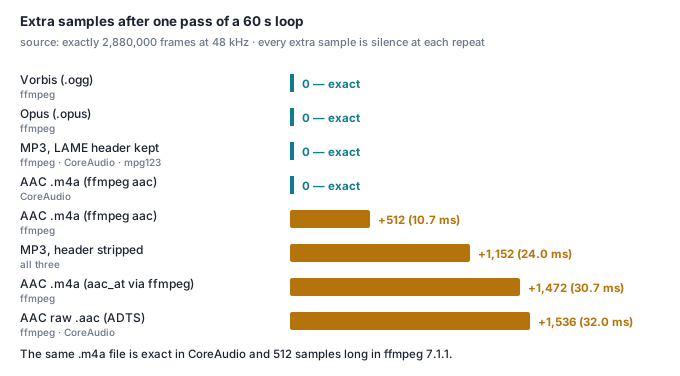
Three things in that table we would not have guessed.
ffmpeg trims AAC priming but not AAC padding. Every .m4a came back with
the leading delay removed and the trailing padding still attached. CoreAudio
trimmed both, on the same file. afinfo showed the container was correct:
"2880000 valid frames + 1024 priming + 512 remainder". The 512 extra samples
are the remainder, and ffmpeg's decode kept them.
One encoder path wrote a wrong file. aac_at (Apple's encoder) driven by
ffmpeg's MP4 muxer produced a container claiming 2,880,528 valid frames. So
even CoreAudio, which honours the edit list, played 528 samples too many.
afconvert with the same Apple encoder wrote the correct 2,880,000. Same
codec, different wrapper, different loop.
Decoders disagree on where the junk goes. With the LAME header stripped, ffmpeg and mpg123 both put 1,105 samples at the front and 47 at the back. CoreAudio put 576 at each end. The total, 1,152, is one MP3 frame in every case.
The gap is not quiet noise. For the stripped MP3, 10.6 ms around the join
stayed below 64 (about -54 dBFS) in a loop that never otherwise goes silent.
On the aac_at file decoded by ffmpeg, the silent run was 30.69 ms.
Do OGG loops click even when the length is right?
Not in our test. Length was the whole problem. For every decode that came back exact, the largest sample step across the join was 762 to 937, against 773 in the source. Lossy coding changes the waveform everywhere. It did not create a step at the seam.
One caution from the same measurement: the ffmpeg AAC decode was noisier in its first 10 ms than mid-file (RMS error 439.9 against 161.7). A short fade or a one-frame crossfade at the loop point hides that. A missing 10 ms does not hide.
Is OGG actually smaller than MP3?
For music, yes. For short sound effects, not always. Sizes in bytes, measured:
| Format and setting | 60 s loop | 10 SFX total | 0.10 s click |
|---|---|---|---|
| WAV, 16-bit 48 kHz stereo | 11,520,044 | 1,595,644 | 19,278 |
| Vorbis q3 | 376,219 | 126,303 | 5,538 |
| Vorbis q5 | 524,467 | 164,561 | 6,454 |
| Opus 64k | 599,762 | 80,154 | 1,469 |
| Opus 96k | 857,086 | 108,359 | 1,991 |
| MP3 128k CBR | 960,768 | 142,848 | 2,688 |
| MP3 192k CBR | 1,441,152 | 214,272 | 4,032 |
| MP3 V2 (VBR) | 745,944 | 147,456 | 3,264 |
AAC 128k (ffmpeg aac) |
1,031,436 | 134,397 | 2,588 |
AAC 128k (ffmpeg aac_at) |
973,142 | 154,005 | 3,446 |
Vorbis q3 averaged 50 kbit/s on the loop (calculated from its size). That is VBR doing well on synthetic, very tonal material. Real recorded music will land higher, so read the music column as a ranking, not a prediction for your soundtrack. The constant-bitrate rows are what they say they are on any input.
The sound-effect column is where the folk wisdom breaks. We encoded one millisecond of audio in each format to isolate the fixed cost per file:
| Format | Bytes for 1 ms |
|---|---|
| Vorbis q3 | 4,117 |
| MP3 128k | 1,152 |
AAC .m4a |
1,091 |
| Opus 64k | 449 |
Vorbis stores its codebooks in a setup header, and that header ships in every file. Ten files carry about 41 KB of it (calculated: 10 × 4,117 bytes), a third of the Vorbis SFX total. Our 0.10 s click was 5,538 bytes as Vorbis and 2,688 as MP3. For a project with hundreds of UI blips, that header is the cost. It is the same lesson as small textures: many small assets are dominated by per-asset overhead, which is why packing a sprite atlas pays.
Do short sound effects keep their length?
Opus and MP3 (with header) returned all ten effects at exactly their source
length through ffmpeg. The ffmpeg aac .m4a files came back 5,764 samples
long in total, and aac_at 15,364.
Vorbis gave a result we could not explain. The loop was exact, but seven of
the ten short .ogg files decoded through ffmpeg came back with the wrong
ending: four lost 128 samples, three gained 64, 96 or 900. The start was
aligned in every case, and ffprobe read the correct length from the
container. So the file stores the right length, and this ffmpeg decode did
not apply it. We had no second Vorbis decoder to hand, so we cannot say
whether a game engine's decoder does better. For a one-shot, 128 samples
(2.7 ms) off the tail is harmless. For a short loop, test it.
Is OGG or MP3 faster to decode?
Every format decoded far faster than real time. This is the CPU a game pays if it decompresses clips on load rather than streaming them. User CPU time for ffmpeg to decode the loop ten times (ten minutes of audio), median of seven runs:
| Format | Run 1 | Run 2 | Per 60 s (calculated) |
|---|---|---|---|
| WAV | 0.046 s | — | 5 ms |
| Vorbis q3 | 0.488 s | 0.987 s | 49–99 ms |
AAC 128k (aac) |
0.758 s | 0.903 s | 76–90 ms |
| MP3 128k | 0.865 s | 1.167 s | 87–117 ms |
| Opus 64k | 1.148 s | 1.721 s | 115–172 ms |
The machine was running other jobs (load average 11 to 15 on eight cores), and individual runs spread by up to 40%. The ordering between Vorbis, AAC and MP3 flipped between runs, so we would not pick between those three on decode cost. Opus was the slowest in both runs. Even so, a 60-second track costs well under 200 ms on this chip, and once decoded the format no longer matters. A level with 40 sound effects totalling a minute of audio pays that once at load. We have the same advice as for compressing animation: measure the decode on the slowest device you ship to, not your desk.
So which format should a game use?
- Music and ambient loops: Vorbis or Opus in Ogg. Both came back sample-exact in every test. Vorbis was smaller on our loop, and Opus took more CPU to decode.
- MP3 is a reasonable second choice if your pipeline already makes it. Keep the LAME header. Some tools rewrite or strip ID3 data and the first frame with it, and the file still plays, just 1,152 samples long.
- Avoid AAC for loops unless you have measured your engine's decoder.
Four of our six
.m4adecodes were long, and the raw.aacwas 32 ms long in both decoders. - Many short sound effects: Opus, or MP3 if Opus is not supported. Vorbis pays about 4 KB of header per file.
- If a format is unavoidable and the gap is not, trim the loop points in the engine. Unity, Godot and most middleware let you set loop start and end samples. Set them from a measurement like the one below, not by ear.
Like a save file format, this is a decision that is cheap now and expensive after a few hundred assets have been exported the wrong way.
Measure the loop gap on your own files
Give it a loop WAV that is exactly the length you want. It encodes six ways,
decodes each with ffmpeg and, on macOS, with CoreAudio, and prints how many
samples each one added. Needs ffmpeg built with libvorbis and libopus, and
lame.
#!/bin/zsh
# loopgap.sh loop.wav: encode one loop six ways, decode each back, count frames.
set -e
in=${1:?usage: loopgap.sh loop.wav}
t=$(mktemp -d); trap 'rm -rf $t' EXIT
N=$(ffprobe -v error -select_streams a:0 -show_entries stream=duration_ts -of csv=p=0 $in)
SR=$(ffprobe -v error -select_streams a:0 -show_entries stream=sample_rate -of csv=p=0 $in)
ffmpeg -v error -i $in -c:a libvorbis -q:a 3      $t/vorbis_q3.ogg
ffmpeg -v error -i $in -c:a libopus  -b:a 64k     $t/opus_64k.opus
lame --quiet -b 128    $in $t/mp3_128.mp3
lame --quiet -t -b 128 $in $t/mp3_128_notag.mp3
ffmpeg -v error -i $in -c:a aac -b:a 128k         $t/aac_128.m4a
ffmpeg -v error -i $in -c:a aac -b:a 128k -f adts $t/aac_128.aac
frames() { ffmpeg -v error -i $1 -f s16le -ac 1 -ar $SR - | wc -c | awk '{print $1/2}'; }
printf '%-20s %10s %8s %9s %8s %8s\n' file bytes ffmpeg gap_ms coreaud gap_ms
for f in $t/*; do
  n=$(frames $f); ca=-; cg=-
  if command -v afconvert >/dev/null && [[ $f != *.ogg && $f != *.opus ]]; then
    afconvert -f WAVE -d LEI16 $f $t/x.wav
    ca=$(( $(frames $t/x.wav) - N )); cg=$(printf %.2f $((ca*1000.0/SR))); rm $t/x.wav
  fi
  printf '%-20s %10d %+8d %9.2f %8s %8s\n' ${f:t} $(stat -f %z $f 2>/dev/null || stat -c %s $f) \
    $((n-N)) $(((n-N)*1000.0/SR)) $ca $cg
done
echo "source: $N frames at $SR Hz"
On our 60-second loop:
$ ./loopgap.sh loop.wav
file                      bytes   ffmpeg    gap_ms  coreaud   gap_ms
aac_128.aac             1039072    +1536     32.00     1536    32.00
aac_128.m4a             1031436     +512     10.67        0     0.00
mp3_128.mp3              960768       +0      0.00        0     0.00
mp3_128_notag.mp3        960384    +1152     24.00     1152    24.00
opus_64k.opus            599762       +0      0.00        -        -
vorbis_q3.ogg            376219       +0      0.00        -        -
source: 2880000 frames at 48000 Hz
A non-zero number in a column means a decoder returned more samples than you exported, and the clip will not loop cleanly without loop points.
What we did not measure
We did not test Unity's, Godot's, FMOD's or Wwise's decoders, or a browser's
decodeAudioData. Those are what a shipped game actually uses, and the
CoreAudio and ffmpeg results above show that decoders disagree on the same
file. Run the script through your engine's import and playback if you can.
The decode timings are from one laptop chip under load, not a phone. We
compared files by waveform and sample count, not by listening, and made no
perceptual quality judgement between, say, Opus 64k and MP3 128k. The music
was synthetic, which flatters VBR encoders.