Is Alpine actually the right base image for Node?
Alpine saves 86 MB over slim and every classic reason to avoid it has quietly expired. What still costs you is sharp running 1.8x slower on musl, and apk. Measured on Node 22.
Use node:22-slim as your default, but the margin is much thinner than the internet thinks, and almost every reason people give for avoiding Alpine no longer reproduces. bcrypt, sharp and better-sqlite3 all install on musl without a compiler. Alpine's DNS resolver is measurably faster than glibc's in the failure mode people blame it for. The two things that actually cost something were both surprises: sharp runs 1.8x slower on musl, and apk add took 941 seconds where apt took 8.9.
All numbers below come from a MacBook Air (Apple M3, 16 GB), Docker Desktop with Docker Engine 29.5.2, an 8-CPU / 7.75 GiB linux/arm64 VM, Node v22.23.2 in all three images. These are indicative timings from one machine on one connection, not a lab benchmark. Sizes are exact; wall-clock is not.
The short answer
node:22-slimis 86 MB larger on disk thannode:22-alpine(256.0 MB vs 169.8 MB) and 22 MB larger to pull (79.9 MB vs 58.1 MB compressed).- The full
node:22image is 1.14 GB — 6.7x Alpine — and there is no good reason to ship it to production. - Neither
node:22-alpinenornode:22-slimcontains a C compiler or Python, so a package that must build from source fails identically on both. bcrypt@6,bcrypt@5.1.1,sharpandbetter-sqlite3all install and run onnode:22-alpinewith no build tools; they ship musl prebuilds.sharpruns 1.8x slower on musl than on glibc — 378 ms against 210 ms for the same 20 JPEG encodes — whilebcryptand pure-JS work are within 2%.- Installing one package with
apk addon Alpine's default CDN took 941 s from our connection; the Debian equivalent took 8.9 s.
How much smaller is node:22-alpine, really?
The same trivial Express app — one server.js, one dependency, npm install --omit=dev — built on each base:
| Base image | Final image | Compressed pull (arm64) | libc | OS packages |
|---|---|---|---|---|
node:22-alpine |
169.8 MB | 58.1 MB | musl 1.2.6 | 18 |
node:22-slim |
256.0 MB | 79.9 MB | glibc 2.36 | 88 |
node:22 |
1,140.2 MB | 399.6 MB | glibc 2.36 | 413 |
Alpine wins, and it is not close against the full image. But look at where the 86 MB actually comes from. The alpine:3.24 rootfs is 8.7 MB; debian:bookworm-slim is 97.2 MB. The difference between those two — 88.5 MB — accounts for the entire gap. Everything else in both images is the Node runtime and npm, roughly 160 MB, and you carry that either way.
That reframes the decision. You are not choosing between a 170 MB image and a 256 MB image so much as between an 8.7 MB distro and a 97 MB one — and the base layer is shared by every image built on it. Run four Node services on one host and you pay the 88 MB once, not four times. docker system df -v shows this directly: the 8.658 MB Alpine rootfs is reported as shared across node:22-alpine, nginx:alpine and postgres:16-alpine on the same daemon, with each image's unique size being its own contents. Size arguments about base images are usually arguments about a layer you already have.
Is Alpine slower to build?
No. Three cold builds each with --no-cache, then a warm build after touching server.js so only the final COPY layer is invalidated:
| Base | Cold build (3 runs) | Warm, source changed | Warm, no change |
|---|---|---|---|
node:22-alpine |
13.9 / 10.2 / 8.8 s | 0.48 s | 0.33 s |
node:22-slim |
11.5 / 7.4 / 11.6 s | 0.32 s | 0.36 s |
node:22 |
10.1 / 10.1 / 9.2 s | 0.29 s | 0.25 s |
The spread inside each column is larger than the spread between them. For a build whose only work is npm install, the base image is not the variable. Cache your package.json layer properly and none of this matters.
Does npm install break on Alpine for native modules?
This is the claim that decides most arguments, so it is the one worth measuring. It did not reproduce.
| Package | node:22-alpine |
node:22-slim |
|---|---|---|
bcrypt@6.0.0 |
installs, runs (3 pkgs) | installs, runs (3 pkgs) |
bcrypt@5.1.1 |
installs, runs (59 pkgs) | installs, runs (59 pkgs) |
sharp |
installs, runs (9 pkgs) | installs, runs (9 pkgs) |
better-sqlite3 |
installs, runs (2 pkgs) | installs, runs (2 pkgs) |
canvas |
fails: no Python | fails: no Python |
bcrypt@6 ships a prebuilds/ directory containing both variants for every platform, selected at load time by node-gyp-build:
node_modules/bcrypt/prebuilds/linux-arm64/bcrypt.musl.node
node_modules/bcrypt/prebuilds/linux-arm64/bcrypt.glibc.node
Even bcrypt@5.1.1, the version most production apps are still pinned to, downloads a musl binary through node-pre-gyp. Its linkage confirms it:
$ ldd node_modules/bcrypt/lib/binding/napi-v3/bcrypt_lib.node
	/lib/ld-musl-aarch64.so.1
	libstdc++.so.6 => /usr/lib/libstdc++.so.6
	libc.musl-aarch64.so.1 => /lib/ld-musl-aarch64.so.1
sharp does the same thing at the package-manager level: on Alpine npm resolves @img/sharp-libvips-linuxmusl-arm64 (17.8 MB), on slim @img/sharp-libvips-linux-arm64 (18 MB). Same node_modules size — 29 MB — either way.
And canvas fails on both, with the same error, for a reason that has nothing to do with libc:
npm error gyp ERR! find Python checking if "python3" can be used
npm error gyp ERR! find Python - executable path is ""
Neither image ships a toolchain. Confirmed directly:
$ docker run --rm node:22-alpine sh -c 'command -v cc gcc g++ make python3'
$ docker run --rm node:22-slim   sh -c 'command -v cc gcc g++ make python3'
$ docker run --rm node:22        sh -c 'command -v cc gcc g++ make python3'
cc gcc g++ make python3
Only the 1.14 GB image has one. So "Alpine needs build tools" is true, and incomplete: slim needs exactly the same build tools, and every README that tells you to apt-get install build-essential is admitting it.
What actually differs between musl and glibc?
Two of the three usual claims did not survive contact with a terminal.
Stack size: no measurable difference. musl's default thread stack is 128 KB against glibc's 8 MB, which is the origin of the folklore. Node sets its own stack for the main thread and for workers, so it never shows up:
| Main thread depth | Worker thread depth | |
|---|---|---|
node:22-alpine |
9,180 | 41,354 |
node:22-slim |
9,182 | 41,356 |
ulimit -s reports 8192 in both. Deep recursion fails at the same place.
DNS: musl is faster, and occasionally gives up. Ordinary resolution is identical — same answers from dns.lookup (libc) and dns.resolve4 (c-ares) for a Docker service alias, a search-suffixed name and a public hostname. The difference appears when a nameserver is unreachable, which is what a rolling DNS pod restart or a half-dead resolver looks like:
docker run --rm --dns 192.0.2.1 --dns 1.1.1.1 <image> node /t.js
| Base | Resolving example.com, first nameserver blackholed (11 runs) |
|---|---|
node:22-alpine |
9 successes — 8 of them 41–103 ms, one 2,574 ms; 2 EAI_AGAIN at ~5,020 ms |
node:22-slim |
11 successes, every one 5,044–15,156 ms |
musl queries every nameserver in parallel and takes the first answer, so it is fifty times faster when it works. glibc walks the list in order and waits out a five-second timeout before it reaches the working server — reliable, and reliably slow. musl's cost is the two runs where nothing valid arrived inside its window and it returned no address at all rather than retrying serially.
So the folklore has the direction wrong. Alpine's resolver is not slower; it is faster and slightly less patient. Both behaviours are defensible and neither is a reason to pick a base image.
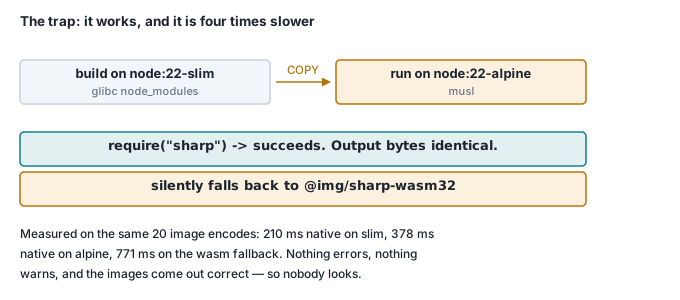
Runtime speed: this is the one that matters. The prebuilds install fine on musl — but they do not run at the same speed. Twenty 2000x2000 JPEG encodes with sharp, five samples each, after warm-up:
| Build | 20 encodes, best of 5 |
|---|---|
sharp on node:22-slim (glibc prebuild) |
210 ms |
sharp on node:22-alpine (musl prebuild) |
378 ms — 1.8x slower |
glibc sharp copied into Alpine (wasm fallback) |
771 ms — 3.7x slower |
That third row is a trap worth naming. Build in a node:22-slim stage, COPY --from=build /app/node_modules into a node:22-alpine runtime, and it does not crash — require("sharp") succeeds and output bytes are identical. npm simply resolved @img/sharp-linux-arm64, that binary cannot load under musl, and sharp falls back to @img/sharp-wasm32 without saying anything. You get a working image running at roughly a quarter of the speed, and nothing in the build log mentions it. Multi-stage builds must keep the same libc on both stages.
The 1.8x on row two is not a sharp bug; it is musl's allocator, which is optimised for size and thread-safety rather than throughput, under a library that allocates hard. It does not generalise. The same containers, same hardware:
| Workload | node:22-alpine |
node:22-slim |
|---|---|---|
bcrypt cost-10, 10 hashes |
463 ms | 454 ms |
| JSON stringify/parse x200 | 29 ms | 26 ms |
Two percent. So the honest rule is not "musl is slow" — it is musl costs you where a native library allocates in a hot loop. Image processing, some compression, some database drivers. If your service does none of that, the performance argument against Alpine does not apply to you.
Why is apk so much slower than apt?
The other measured Alpine cost has nothing to do with libc at all. Installing a single package into node:22-alpine:
| Command | Wall clock |
|---|---|
apk add --no-cache python3 (default dl-cdn) |
941 s |
apk add --no-cache python3 (pinned fast mirror) |
162 s |
apt-get install -y --no-install-recommends python3 on slim |
8.9 s |
This is a throughput problem, not a distance one. Round-trip time to dl-cdn.alpinelinux.org was 31 ms and to deb.debian.org 35 ms — effectively the same. Throughput was not:
| Host | Index download throughput (3 runs) |
|---|---|
deb.debian.org |
2.7 / 4.5 / 3.4 MB/s |
dl-cdn.alpinelinux.org |
20 / 8 / 26 KB/s |
uk.alpinelinux.org |
90 / 39 KB/s |
mirrors.aliyun.com/alpine |
391 KB/s |
Roughly a hundredfold, consistently, from this connection in Vietnam. Debian runs a large mirror network that resolves to something near you; Alpine points everyone at one CDN, and when that CDN is unhappy your build sits there. Your mileage will differ by location — but the structural asymmetry will not, and you cannot see it until you have already committed a Dockerfile.
If you use Alpine and ever run apk add, pin a mirror explicitly. It is one line and it turned 941 seconds into 162.
RUN sed -i 's|dl-cdn.alpinelinux.org|mirrors.aliyun.com|g' /etc/apk/repositories \
 && apk add --no-cache build-base python3
Which one should you actually pick?
Default to node:22-slim. The 22 MB of compressed pull you give up is smaller than most node_modules directories, and it is a one-time cost per host because the base layer is shared. What you get back is the environment every native prebuild is tuned for, apt-get when something has to compile, and no silent wasm fallback waiting for the first person who writes a multi-stage Dockerfile. Boring is the feature.
Choose node:22-alpine when image size is a real constraint — many nodes cold-pulling, a bandwidth-metered edge, an image shipped to a customer's hardware — and your hot path is not native code that allocates. A JSON API in front of Postgres will not notice musl. An image or video pipeline will notice it by 80%. Check which one you are before you decide, then pin an apk mirror either way.
Never ship node:22. 1.14 GB and 413 OS packages to run a process that needs one binary. It is a fine build stage — it is the only one of the three with gcc and python3 already installed — but the runtime stage should copy node_modules out of it into slim, and only into slim. Mixing a glibc build stage with an Alpine runtime is the 771 ms row above.
What surprised me most is that the two things I set out to measure — install failures and build times — turned out to be non-events, and the two things that mattered were ones I did not expect to find. Alpine's reputation is built on a problem the ecosystem solved with prebuilds. Its actual cost in 2026 is a runtime allocator and a package CDN.
Check it yourself
Reproduce the whole comparison in about a minute, minus the network-bound parts:
mkdir alpinetest && cd alpinetest
printf '{"name":"t","version":"1.0.0","dependencies":{"express":"5.1.0"}}' > package.json

for base in node:22-alpine node:22-slim node:22; do
  printf "FROM $base\nWORKDIR /app\nCOPY package.json ./\nRUN npm install --omit=dev --no-audit --no-fund\n" > Dockerfile
  docker build -q -t "sizetest:${base##*:}" . >/dev/null
  printf "%-16s %s bytes\n" "$base" "$(docker image inspect sizetest:${base##*:} --format '{{.Size}}')"
done
The three results that matter most:
# 1. Native modules on musl — expect "OK", not a compiler error
docker run --rm node:22-alpine sh -c \
  'cd /tmp && npm init -y >/dev/null && npm i bcrypt sharp --no-audit --no-fund >/dev/null 2>&1 \
   && node -e "require(\"bcrypt\");require(\"sharp\");console.log(\"OK, no compiler needed\")"'

# 2. The musl allocator tax — alpine ~378 ms, slim ~210 ms
cat > bench.js <<'EOF'
const s = require('sharp');
(async () => {
  const img = { create: { width: 2000, height: 2000, channels: 3, background: '#f00' } };
  for (let w = 0; w < 3; w++) await s(img).jpeg().toBuffer();
  const runs = [];
  for (let r = 0; r < 5; r++) {
    const t = Date.now();
    for (let i = 0; i < 20; i++) await s(img).jpeg().toBuffer();
    runs.push(Date.now() - t);
  }
  console.log('20 encodes, best of 5:', Math.min(...runs), 'ms');
})();
EOF
for b in node:22-alpine node:22-slim; do
  printf "%-16s " "$b"
  docker run --rm -v "$PWD/bench.js:/bench.js:ro" "$b" sh -c \
    'mkdir -p /app && cd /app && cp /bench.js . && npm init -y >/dev/null \
     && npm i sharp --no-audit --no-fund >/dev/null 2>&1 && node bench.js'
done

# 3. DNS failover, dead nameserver first. Run it a few times: alpine is usually
#    ~90 ms and occasionally FAIL EAI_AGAIN; slim is reliably ~5 s.
printf 'const t=Date.now();require("dns").lookup("example.com",(e,a)=>console.log(e?"FAIL "+e.code:"OK "+a,Date.now()-t+"ms"))' > t.js
for b in node:22-alpine node:22-slim; do
  printf "%-16s " "$b"
  docker run --rm --dns 192.0.2.1 --dns 1.1.1.1 -v "$PWD/t.js:/t.js:ro" "$b" node /t.js
done
Clean up:
docker rmi sizetest:22-alpine sizetest:22-slim sizetest:22
cd .. && rm -rf alpinetest    # bench.js and t.js go with it
Where this goes next
Every image we ship to a customer is built this way, and the base choice is part of what makes shipping as a Docker image something reasonable to ask of someone else's ops team — a 58 MB pull that needs no compiler on their side. Related: where your database actually lives and self-hosting without support hell.