Where your database actually lives, and why it matters at 3 a.m.
A named volume hides your data inside Docker, where one wrong flag deletes it and ordinary tools cannot see it. Moving Postgres to a bind mount takes about a minute — here is the order that keeps a rollback available the whole time.
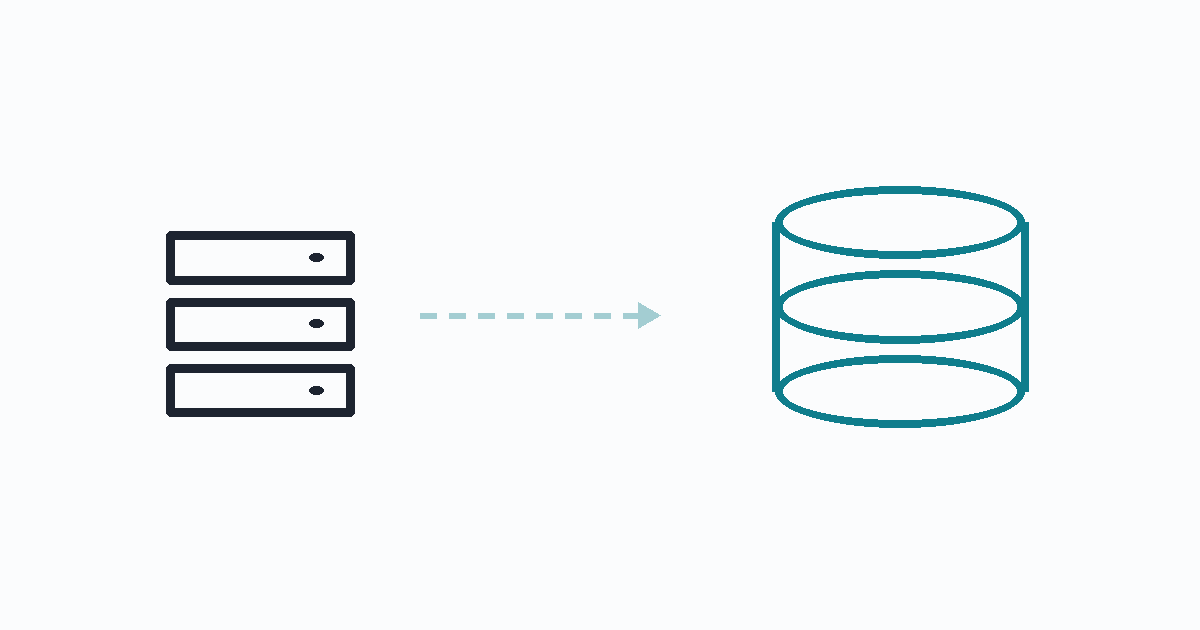
Put your database on a bind mount, not a named volume. Same performance, same container, but the data sits at a path you chose, rsync and tar can see it, and no docker compose flag can remove it by accident.
And be clear about what this does not buy you: it is not a backup. Same disk, same machine. It changes what can delete your data, not what can lose it.
The default, and its two problems
The compose file everyone starts with:
services:
  postgres:
    image: postgres:16
    volumes:
      - pgdata:/var/lib/postgresql/data
volumes:
  pgdata:
Docker puts that at /var/lib/docker/volumes/<project>_pgdata/_data, a path you did not choose and will not remember.
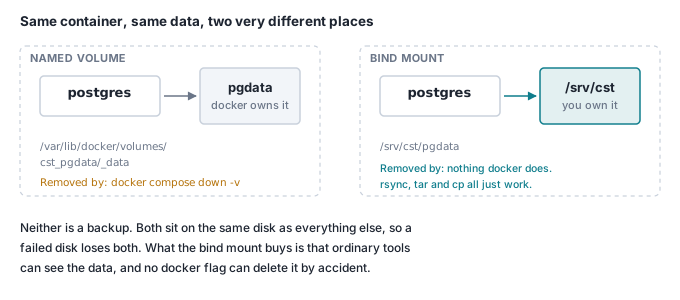
Problem one: down -v. The -v flag removes named volumes. It appears in every "reset my environment" answer online, it is muscle memory from local development, and on a production host it deletes your database with no confirmation.
docker compose down -v      # on your laptop: a clean slate
                            # on the server:  your database is gone
There is no undo, and the command looks routine in shell history.
Problem two: the data is somewhere awkward. Backing it up means either knowing the volume path by heart or running a helper container just to read files. Every ordinary tool — rsync, tar, cp, a snapshot script, du when you are wondering what filled the disk — needs a detour.
The change
services:
  postgres:
    image: postgres:16
    volumes:
      - /srv/cst/pgdata:/var/lib/postgresql/data   # a path you chose
# the `volumes:` block at the bottom goes away entirely
That is the whole difference. Postgres cannot tell.
Migrating without a moment where the data exists once
The order matters, because the goal is that a rollback is available at every step.
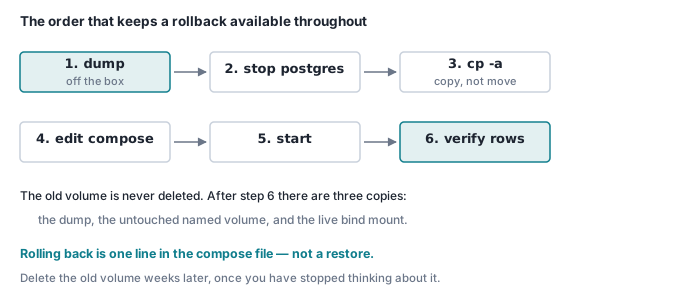
# 1. A dump, off the machine entirely. Do this even for a "safe" change.
pg_dump "$DATABASE_URL" -Fc -f ~/pre-migration.dump

# 2. Stop only the database. Other containers can keep running.
docker compose stop postgres

# 3. COPY — never move. cp -a preserves ownership, which matters: the
#    postgres user inside the container is uid 999.
mkdir -p /srv/cst/pgdata
cp -a /var/lib/docker/volumes/cst_pgdata/_data/. /srv/cst/pgdata/
chown -R 999:999 /srv/cst/pgdata
chmod 700 /srv/cst/pgdata          # Postgres refuses to start on a loose data dir

# 4. Edit the compose file, then bring it back
docker compose up -d

# 5. Verify against something you knew before you started
docker compose exec -T postgres psql -U app -d app -c "SELECT count(*) FROM users;"
Total downtime for ours was around thirty seconds, most of it the container restart.
Do not delete the old volume. After this you have three copies: the dump, the untouched named volume, and the live bind mount. Rolling back is one line in the compose file rather than a restore. Delete the old volume in a few weeks, when you have stopped thinking about it.
Confirm what the container is actually using:
docker inspect cst-postgres --format '{{range .Mounts}}{{.Type}} {{.Source}}{{"\n"}}{{end}}'
# bind /srv/cst/pgdata
bind, not volume. If it still says volume, the compose file did not take.
The bug that ate half my migration script
The first run of this stopped silently in the middle. The database dumped fine, and then nothing — no error, no further output.
The script was being piped into a shell:
cat migrate.sh | ssh host sudo bash
and it contained:
docker compose exec -T postgres pg_dump ... > dump.sql
docker compose exec -T reads standard input — and standard input was the rest of the script. pg_dump consumed every remaining line as input it did not need, and the shell had nothing left to execute. No error, because nothing went wrong: a program read from stdin, exactly as asked.
Two fixes, either works:
docker compose exec -T postgres pg_dump ... < /dev/null > dump.sql # give it nothing
scp migrate.sh host:/tmp/ && ssh host 'sudo bash /tmp/migrate.sh' # do not pipe
The general rule: a script piped into a shell shares stdin with everything it runs. Any command that reads stdin — docker exec -i, ssh without -n, mysql, read — will eat the rest of your script. This is worth knowing before it happens rather than after.
What this does not fix
Say it plainly, because a bind mount feels safer than it is:
| Risk | Named volume | Bind mount |
|---|---|---|
docker compose down -v |
deletes it | untouched |
| Backup with ordinary tools | needs a detour | works |
| Disk failure | loses everything | loses everything |
| Machine loss | loses everything | loses everything |
rm -rf the wrong path |
— | deletes it |
The bottom three rows are the ones that actually take companies down, and a bind mount does nothing for any of them. The fix for those is a dump, on a schedule, copied somewhere else:
0 3 * * * pg_dump "$DATABASE_URL" -Fc \
  | gzip > /srv/backups/db-$(date +\%F).dump.gz
Then copy it off the machine, and restore it somewhere once. A backup you have never restored is a hypothesis.
Check it yourself
Watch down -v do its thing, on data you do not care about:
mkdir vtest && cd vtest
cat > docker-compose.yml <<'EOF'
services:
  db:
    image: postgres:16
    environment: { POSTGRES_PASSWORD: demo }
    volumes: [pgdata:/var/lib/postgresql/data]
volumes:
  pgdata:
EOF

docker compose up -d && sleep 6
docker compose exec -T db psql -U postgres -c "CREATE TABLE keepme (id int);"
docker compose exec -T db psql -U postgres -c "\dt"        # keepme is there

docker compose down -v                                     # the flag
docker compose up -d && sleep 6
docker compose exec -T db psql -U postgres -c "\dt"        # "Did not find any relations."
Now change volumes: [pgdata:...] to volumes: ["./data:/var/lib/postgresql/data"] and repeat. After down -v, keepme is still there — the flag has nothing to remove.
docker compose down -v && rm -rf vtest
Where this goes next
This is the Postgres behind the Game Asset Generator and everything else on the same box. It is also part of what makes shipping as a Docker image reasonable to ask of a customer: their data goes on a path they picked, on their machine, and nothing we ship can remove it.
Earlier in this series: a job queue in Postgres, how a worker authenticates, moving files with only a password prompt, and one Caddyfile for TLS and routing.