What does a graceful shutdown actually require?
Five steps in order — fail readiness, wait for the load balancer, stop accepting, drain in-flight work, force-exit on a deadline — and a grace period longer than your slowest job. Measured on Node 23 and Docker 29.

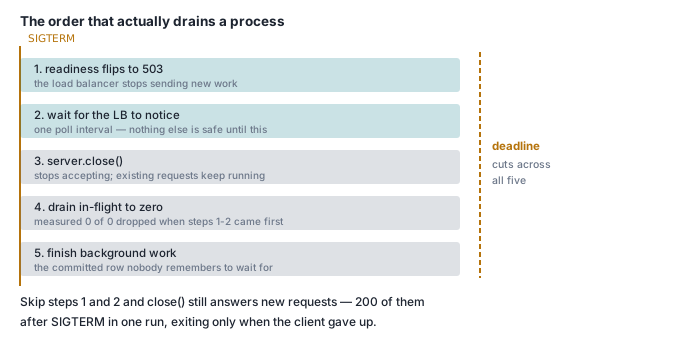
A graceful shutdown is five steps in a fixed order: fail readiness, wait one health-check interval, stop accepting new connections, finish in-flight requests and in-flight work, then force-exit on a deadline. Skip any one of them and you lose requests on every deploy. Get all five right and you can still lose work, because the container runtime kills you on its own schedule and that schedule is shorter than most people think.
Everything below was measured on an Apple M3 (8 cores, 16 GB, macOS 26.4.1), Docker Desktop 29.5.2 with engine 29.5.2, node:23-alpine running Node v23.11.1, and Caddy v2.11.4. Every number is the spread of three runs.
The short answer
server.close()does not shut a Node server down. Behind a proxy that pools connections, aclose()-only process was still alive 25 seconds later in all three runs, still serving traffic on connections it had already accepted.- On Node 23,
server.close()closes sockets that are idle at that instant, then never sweeps again. A socket that goes idle a millisecond later waits out the fullkeepAliveTimeout— measured 6.0 s at the 5 s default, 16.1 s at 15 s. - With no
SIGTERMhandler and Node running as PID 1, the signal is ignored entirely. The container survivesdocker kill -s TERMindefinitely and is always SIGKILLed. Run Node as PID 2 instead and it dies in ~300 ms, dropping every in-flight request. docker stopgives you 10 seconds by default, and on this host it gave 1. Every container created by Docker Desktop 29.5.2 hadStopTimeout: 1. A 15 s background job died with 23 of 30 steps written at-t 10, and 6 of 30 at this host's default. Neither committed.- Without a drain deadline, one stuck request holds the process forever. A correct drain with a 10-minute request in flight was still running at 60 seconds, three times out of three.
What actually happens on SIGTERM with no handler?
Nothing, if Node is PID 1. That is the first surprise.
$ docker run -d --name cite-shut-pid1 -p 55641:8080 -e MODE=none cite-shut:1
$ docker exec cite-shut-pid1 ps -o pid,comm | head -2
PID   COMMAND
    1 MainThread
$ docker kill -s TERM cite-shut-pid1; sleep 3
$ docker inspect -f 'running={{.State.Running}}' cite-shut-pid1
running=true
The kernel does not apply default signal dispositions to PID 1. A process with no handler installed for SIGTERM gets terminated everywhere except as PID 1, where the signal is simply discarded. CMD ["node", "app.js"] makes Node PID 1. So the common belief that "Node exits on SIGTERM by default" is true on your laptop and false in your container.
Add --init — which puts a tiny init as PID 1 and Node at PID 2 — and the default disposition applies again. Under 20 concurrent keep-alive clients each issuing 300 ms requests, with the signal sent 3 seconds in:
| Shutdown handler | Dropped mid-flight | Served after SIGTERM | Time to exit |
|---|---|---|---|
| none, Node as PID 1 | — signal ignored | keeps serving | never |
| none, Node as PID 2 | 20 / 20 / 40 | 0 | 262 / 275 / 366 ms |
server.close() only |
0 / 0 / 0 | 200 / 200 / 200 | 3367 / 3399 / 3467 ms |
| full drain | 0 / 0 / 0 | 60 / 200 / 200 | 1310 / 3352 / 3378 ms |
Twenty is the concurrency, so with no handler every request in flight died. The client saw ECONNRESET — which, as the retry decision table says, is the one network error you must not blindly retry on a POST, because the server may already have done the work.
Does server.close() finish in-flight requests?
Yes — and then it keeps serving new ones, which is the actual problem.
Look again at row three. server.close() dropped nothing, but it answered 200 more requests after the SIGTERM, and the process exited at 3.4 s — precisely when the load generator stopped. The listener was closed; the already-accepted keep-alive connections were not, and Node happily served request after request on them.
Put a real proxy in front and it does not end. Two replicas behind Caddy, roll one:
MODE=close  replica_A_alive_after_SIGTERM_ms=NEVER(>25s)
MODE=close  replica_A_alive_after_SIGTERM_ms=NEVER(>25s)
MODE=close  replica_A_alive_after_SIGTERM_ms=NEVER(>25s)
MODE=full   replica_A_alive_after_SIGTERM_ms=2231   drained in 2013 ms
MODE=full   replica_A_alive_after_SIGTERM_ms=2175   drained in 2007 ms
MODE=full   replica_A_alive_after_SIGTERM_ms=2156   drained in 2002 ms
Now the part that contradicted what we expected. The received wisdom is that server.close() leaves idle keep-alive sockets open. On Node 23 it does not. One raw socket, one completed request, then silence, then SIGTERM:
{"headers":["HTTP/1.1 200 OK", ..., "Connection: keep-alive","Keep-Alive: timeout=5"]}
--- sending SIGTERM at t=2s ---
{"socket_closed_at_ms":1969}
05:48:47.930 [app] SIGTERM -> server.close()
05:48:47.931 [app] server.close() callback after 1 ms
One millisecond — close() hung up the idle socket itself. But it sweeps once. Repeat with the request still in flight when the signal lands — a 4-second request, SIGTERM at 1 s:
{"response_at_ms":4010,"headers":[... "Connection: keep-alive","Keep-Alive: timeout=5"]}
{"socket_closed_at_ms":10018,"got_response":true}
05:50:04.580 [app] server.close() callback after 9042 ms
The in-flight request finished. Then the server told the client Connection: keep-alive anyway, and that socket — now idle, but idle after the sweep — sat there until keepAliveTimeout expired. Nine seconds for a four-second request. The knob is exactly that timeout:
server.keepAliveTimeout |
server.close() callback fires after |
|---|---|
| 1000 ms | 91 / 122 / 181 ms |
| 5000 ms (Node's default) | 6032 / 6069 / 6084 ms |
| 15000 ms | 16071 / 16116 / 16138 ms |
So server.close() alone gives you a shutdown that takes either your keep-alive timeout or, if clients keep talking, as long as they feel like.
What is the sequence that actually works?
process.on('SIGTERM', async () => {
  // 1. fail readiness first. The load balancer needs to be told.
  ready = false;

  // 2. give it one poll interval to notice, before you break anything.
  await sleep(PRESTOP_MS);

  // 3. stop accepting new connections.
  const closed = new Promise((r) => server.close(r));

  // 4. sweep idle keep-alive sockets repeatedly — close() only sweeps once,
  //    and sockets keep going idle while you drain.
  server.closeIdleConnections();
  const sweep = setInterval(() => server.closeIdleConnections(), 100);

  // 5. the deadline. Non-negotiable. See the next section.
  setTimeout(() => {
    console.log(`DEADLINE hit — forcing exit, inflight=${inflight}`);
    process.exit(1);
  }, DRAIN_MS).unref();

  // 6. wait for in-flight requests AND in-flight work.
  await closed;
  if (job && !job.finished) await job.promise;
  clearInterval(sweep);
  process.exit(0);
});
Step 1 before step 3 is the whole point, and it is why /readyz has to be a health check that can actually fail. Readiness failing means "stop sending me traffic". That is exactly what a shutting-down process is asking for.
The repeated sweep in step 4 is what close() does not do for you. It is also a race you can lose: in one of three full-drain runs against a client that kept hammering the socket regardless of readiness, the sweep closed sockets out from under 1918 in-flight writes. Zero requests already in progress were lost — but 1918 new ones failed, because the client wrote onto a socket the server had just hung up. Closing idle sockets is only safe once new requests have stopped arriving. Steps 1 and 2 are what make step 4 safe.
Why do you need a deadline?
Because a single stuck request outlives you. MODE=full with the deadline removed and one request that will not return for ten minutes:
no-deadline DRAIN_MS=0 exited_after_ms=NEVER (still running at 60000 ms) exit_code=0
no-deadline DRAIN_MS=0 exited_after_ms=NEVER (still running at 60000 ms) exit_code=0
no-deadline DRAIN_MS=0 exited_after_ms=NEVER (still running at 60000 ms) exit_code=0
With DRAIN_MS=5000:
deadline-5s exited_after_ms=5270 exit_code=1  DEADLINE 5000 ms hit — forcing exit, inflight=1
deadline-5s exited_after_ms=5243 exit_code=1  DEADLINE 5000 ms hit — forcing exit, inflight=1
deadline-5s exited_after_ms=5226 exit_code=1  DEADLINE 5000 ms hit — forcing exit, inflight=1
5226–5270 ms, exit code 1, and a log line naming what it abandoned. Exit 1 is deliberate: a drain that hit its deadline is not a clean shutdown, and you want that visible in your orchestrator.
How long does docker stop wait?
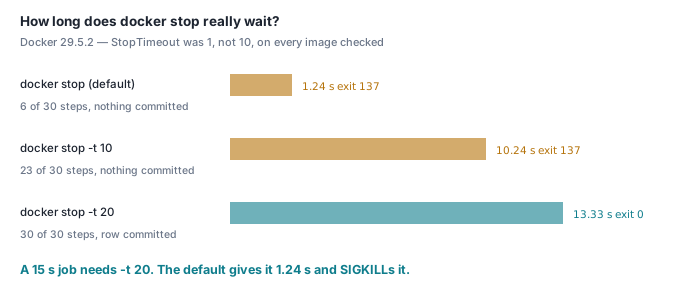
Ten seconds, says the documentation. On this host it was one.
$ docker inspect -f '{{.Config.StopTimeout}}' cite-shut-t1
1
Every container created by Docker Desktop 29.5.2 on this machine — from nginx:alpine, from our own image, with no flags — came out with StopTimeout: 1. Neither base image sets it. Whatever the provenance, the lesson generalises: you do not know your grace period unless you set it.
Here is what it costs. A background job of 30 steps at 500 ms — 15 seconds of work, each step fsynced — started, then the container stopped two seconds in. The app has a correct drain with a 60-second internal deadline, so the app is not the variable:
docker stop |
Wall time | Exit code | Steps written | Committed? |
|---|---|---|---|---|
default (StopTimeout: 1) |
1.24 / 1.26 / 1.24 s | 137 | 6 / 30 | no |
-t 10 (the documented default) |
10.24 / 10.25 / 10.22 s | 137 | 24 / 23 / 23 of 30 | no |
-t 20 |
13.32 / 13.38 / 13.39 s | 0 | 30 / 30 | yes |
Exit 137 is 128 + 9: SIGKILL. At the documented ten-second default this job died three-quarters finished with no commit record, every single run. The application code was perfect. The grace period was not long enough, and nothing warned us — the only visible symptom is an exit code most dashboards render as a grey box.
Set it explicitly, and set it longer than your slowest unit of work:
services:
  app:
    stop_grace_period: 30s      # compose
docker run --stop-timeout 30 ...
Does a retrying proxy make all of this unnecessary?
For GETs, almost. This is the measurement that surprised us most.
Two replicas behind Caddy, one rolled mid-load, 20 concurrent clients. Caddy's reverse_proxy with active health checks (health_uri /readyz, health_interval 1s) but no retry configured:
| App shutdown | Client-visible failures per run |
|---|---|
| no handler | 50–70 × 502, plus 5–7 × 503 |
server.close() only |
0–2 × 503 |
| full drain | 4–5 × 503 |
| full drain + 2 s pre-stop | 4–5 × 503 |
The pre-stop wait changed nothing, which told us the residual 503s were not the app's fault. Adding two lines to the Caddyfile:
lb_try_duration 5s
lb_try_interval 100ms
took every mode to zero failures — including the app with no SIGTERM handler at all. A proxy that will try the other replica hides a completely ungraceful shutdown from anyone issuing GETs. If that is your whole workload, this article is optional. See one Caddyfile for TLS and routing for where those directives live.
Now the same rig with POSTs that write a row before doing their work:
| App shutdown | Failed POSTs | p99 latency | max latency | Rows already written for the failed POSTs |
|---|---|---|---|---|
| no handler | 10 / 10 / 10 (502) | 515–533 ms | 734–1050 ms | 10 of 10 |
server.close() only |
0 | 334–340 ms | 420–432 ms | — |
| full drain + pre-stop | 0 | 332–338 ms | 414–427 ms | — |
Ten POSTs per run came back to the client as 502. Every one of them had already written its row. The proxy would not retry them — and it was right not to, because retrying is how you charge the card twice. Graceful shutdown is what turns those ten unknowns into zero. The p99 tells the smaller half of the story: 515–533 ms against 332–338 ms, roughly a 55% p99 regression from one rolled replica.
The checklist
- Make sure the signal arrives.
--init, ortini, or anexec-form entry point where your process is not PID 1. Verify withdocker kill -s TERM. - Fail readiness first. Set the flag before touching a socket.
- Wait at least one health-check interval before you stop accepting.
server.close(), thencloseIdleConnections()on a repeating interval —close()sweeps once and never again.- Await in-flight requests and in-flight work. They are different sets.
- Force-exit on a deadline, with a non-zero code and a log line naming what you abandoned.
- Set
stop_grace_period/--stop-timeoutexplicitly, longer than the drain deadline, which is longer than your slowest job. Never inherit it.
Check it yourself
Ports 55641 and 55644, containers prefixed cite-shut-. Two files. The MODE=full branch is the sequence from above, unabridged.
// app.js
import http from 'node:http';
import fs from 'node:fs';
import { setTimeout as sleep } from 'node:timers/promises';

const MODE = process.env.MODE || 'none';          // none | close | full
const DRAIN_MS = Number(process.env.DRAIN_MS || 0);
const PRESTOP_MS = Number(process.env.PRESTOP_MS || 0);
let ready = true, inflight = 0, job = null;
const log = (...a) => console.log(new Date().toISOString().slice(11, 23), '[app]', ...a);

function startJob(steps, stepMs) {                 // in-flight WORK, not a request
  const s = { total: steps, done: 0, finished: false };
  fs.writeFileSync('/data/job.log', `START steps=${steps}\n`);
  s.promise = (async () => {
    for (let i = 1; i <= steps; i++) {
      await sleep(stepMs);
      const fd = fs.openSync('/data/job.log', 'a');
      fs.writeSync(fd, `step ${i}/${steps}\n`); fs.fsyncSync(fd); fs.closeSync(fd);
      s.done = i;
    }
    const fd = fs.openSync('/data/job.log', 'a');
    fs.writeSync(fd, `COMMIT steps=${steps}\n`); fs.fsyncSync(fd); fs.closeSync(fd);
    s.finished = true; log('job COMMIT');
  })();
  return (job = s);
}

const server = http.createServer(async (req, res) => {
  const u = new URL(req.url, 'http://h');
  if (u.pathname === '/readyz') {
    res.writeHead(ready ? 200 : 503, { 'content-type': 'application/json' });
    return res.end(JSON.stringify({ ready, inflight }));
  }
  if (u.pathname === '/job') {
    startJob(Number(u.searchParams.get('steps') || 30), Number(u.searchParams.get('step_ms') || 500));
    res.writeHead(202); return res.end('{"started":true}');
  }
  inflight++;                                       // /slow?ms=N
  try {
    await sleep(Number(u.searchParams.get('ms') || 300));
    res.writeHead(200, { 'content-type': 'application/json' });
    res.end('{"ok":true}');
  } finally { inflight--; }
});
server.listen(8080, () => log(`up MODE=${MODE} DRAIN_MS=${DRAIN_MS} node ${process.version}`));

if (MODE === 'close') process.on('SIGTERM', () => {
  const t0 = Date.now();
  server.close(() => { log(`close() callback after ${Date.now() - t0} ms`); process.exit(0); });
});

if (MODE === 'full') process.on('SIGTERM', async () => {
  const t0 = Date.now();
  ready = false;                                    // 1. fail readiness
  if (PRESTOP_MS) await sleep(PRESTOP_MS);          // 2. let the LB notice
  const closed = new Promise((r) => server.close(r));  // 3. stop accepting
  server.closeIdleConnections();                    // 4. sweep, and keep sweeping
  const sweep = setInterval(() => server.closeIdleConnections(), 100);
  if (DRAIN_MS) setTimeout(() => {                  // 5. the deadline
    log(`DEADLINE ${DRAIN_MS} ms — forcing exit, inflight=${inflight} job=${job ? job.done + '/' + job.total : 'none'}`);
    process.exit(1);
  }, DRAIN_MS).unref();
  await closed;                                     // 6. requests AND work
  if (job && !job.finished) { log(`waiting for job at ${job.done}/${job.total}`); await job.promise; }
  clearInterval(sweep);
  log(`drained in ${Date.now() - t0} ms`); process.exit(0);
});
FROM node:23-alpine
WORKDIR /app
RUN echo '{"type":"module"}' > package.json
COPY app.js ./
CMD ["node", "app.js"]
docker build -t cite-shut:demo .

# 1. the signal never arrives, because Node is PID 1
docker run -d --name cite-shut-pid1 -p 55641:8080 -e MODE=none cite-shut:demo
sleep 2 && docker kill -s TERM cite-shut-pid1 && sleep 3
docker inspect -f 'running={{.State.Running}}' cite-shut-pid1     # running=true
docker rm -fv cite-shut-pid1

# 2. the grace period, against a 15 s job. Change 10 to 20 and it commits.
docker volume create cite-shut-data
docker run -d --init --name cite-shut-job -p 55644:8080 -v cite-shut-data:/data \
  -e MODE=full -e DRAIN_MS=60000 cite-shut:demo
sleep 2 && curl -s "http://127.0.0.1:55644/job?steps=30&step_ms=500" && sleep 2
time docker stop -t 10 cite-shut-job
docker inspect -f 'exit={{.State.ExitCode}}' cite-shut-job
docker run --rm -v cite-shut-data:/data alpine tail -3 /data/job.log

docker rm -fv cite-shut-job && docker volume rm cite-shut-data
That produced, on the hardware named at the top:
docker stop -t 10 : wall=10.26s exit=137 steps=23/30 committed=0
docker stop -t 20 : wall=13.37s exit=0   steps=30/30 committed=1
If your -t 10 commits where ours did not, your job is faster than fifteen seconds. If your unflagged docker stop behaves like the -t 10 row, check docker inspect -f '{{.Config.StopTimeout}}' — that value, not the app, decides.
Where this goes next
Steps 1 and 2 of the sequence are only as good as the endpoint behind them, which is health checks that tell you something, and the POST table above is the shutdown-shaped case of which errors to actually retry.
This is the deploy path under the workers in Workflow Builder, where a rolled container mid-run is not a dropped request but a half-finished automation — and where the grace period has to outlast the longest step, not the median one.