Your React site is invisible to ChatGPT, and the fix is a build step
GPTBot, ClaudeBot and PerplexityBot do not run JavaScript. A client-rendered SPA serves them an empty div, so nothing you wrote can ever be quoted. Prerendering fixes it without giving up a dynamic site.

Prerender every route to static HTML at build time. AI crawlers do not execute JavaScript, so a client-rendered single-page app serves them an empty <div id="root"> — no title, no content, nothing to quote. If you want to be cited in an AI answer, the words have to be in the HTML.
This is not a theory. It was true of our own site until recently, and this is the fix, measured before and after.
Check yours in one command
curl -A GPTBot https://yoursite.com/some/page | head -30
Ours returned this, on every route:
<head>
  <title>CST Solution — AI software</title>     <!-- the same on every page -->
</head>
<body>
  <div id="root"></div>                          <!-- and that is all of it -->
</body>
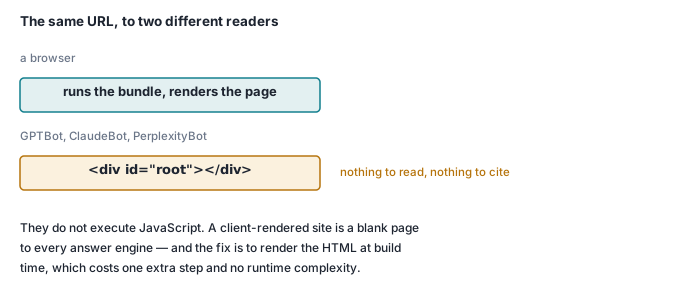
Every product page had the same generic title and no body. ChatGPT could not have told anyone what any of our products did, because from where it stands there was nothing on the page.
Google is the partial exception — it renders JavaScript, eventually, on a separate and slower pass. GPTBot, ClaudeBot, PerplexityBot and OAI-SearchBot do not. As answer engines take a growing share of how people find things, that gap stops being an SEO nicety.
Prerendering, without giving up a dynamic site
The trick is that "static HTML" and "dynamic content" are not opposites. Render the routes at build time; let the client hydrate and refresh afterwards.
"scripts": {
  "build": "vite build && vite build --ssr src/entry-server.jsx --outDir dist/server && node prerender.js"
}
Three steps: the browser bundle, a server bundle used only at build time, and a script that walks the routes.
// prerender.js — the essential part
const { render } = await import('./dist/server/entry-server.js')
const template = fs.readFileSync('dist/index.html', 'utf8')

for (const route of routes) {
  const appHtml = render(route.url, data)

  const html = template
    .replace('</head>', `${headTagsFor(route)}\n</head>`)
    .replace('<div id="root"></div>',
      `<div id="root">${appHtml}</div>
       <script>window.__DATA__=${JSON.stringify(data).replace(/</g, '\\u003c')};</script>`)

  const dir = route.url === '/' ? 'dist' : path.join('dist', route.url)
  fs.mkdirSync(dir, { recursive: true })
  fs.writeFileSync(path.join(dir, 'index.html'), html)
}
Two details carry most of the value.
Hydrate, do not re-render. On the client, attach to the markup that is already there:
const container = document.getElementById('root')
if (container.hasChildNodes()) hydrateRoot(container, tree)
else createRoot(container).render(tree)
Call createRoot().render() on prerendered markup and React throws the HTML away and rebuilds it, which wastes the work and causes a visible flash.
Escape the embedded JSON. .replace(/</g, '\\u003c') is not decoration: a </script> sequence inside your data ends the script tag early and turns your content into an injection vector.
Per-page metadata is the point
Prerendering that leaves every page with the same <title> gains you little. Each route needs its own title, description, canonical URL and structured data:
const head = [
  `<title>${esc(route.title)}</title>`,
  `<meta name="description" content="${esc(route.desc)}" />`,
  `<link rel="canonical" href="${SITE}${route.url}" />`,
  `<script type="application/ld+json">${JSON.stringify(jsonLd(route))}</script>`,
].join('\n')
JSON-LD is worth the twenty minutes. It states the facts — what this product is, what it costs, who publishes it — in a form a machine does not have to infer from your markup. Ours emits SoftwareApplication with offers on product pages and Organization elsewhere.
Serve the files in the right order
A prerendered site still needs the SPA fallback for unknown routes, and the order matters:
try_files {path} {path}/index.html /index.html
Real file, then the prerendered index.html for that route, then the shell. Put /index.html first and every request gets the empty shell — which is exactly the bug you set out to fix, now with extra steps.
Two files worth adding while you are here
robots.txt — allow the AI crawlers. Many sites block them by reflex. If you want to be cited, say so:
User-agent: GPTBot
Allow: /

User-agent: ClaudeBot
Allow: /

User-agent: PerplexityBot
Allow: /

Sitemap: https://yoursite.com/sitemap.xml
llms.txt — a plain-language map of the site. An emerging convention: one markdown file describing what you do and what each page is for. Honestly, it is not yet clear how widely it is consumed — but it is generated from data you already have, and it means an AI reading your site gets a correct summary instead of one inferred from navigation markup.
Generate both from the same source as the sitemap, in the same build step, so they cannot drift.
Check it yourself
Before and after, on your own site:
# what a crawler sees
curl -A GPTBot https://yoursite.com/a/page | grep -E '<title>|<h1>'

# what a browser sees
curl https://yoursite.com/a/page | grep -E '<title>|<h1>'
If those differ, the crawler is reading a different site to your visitors. After prerendering, ours returns:
<title>Simple CRM — CST Solution</title>
"@type":"SoftwareApplication"
"@type":"Organization"
Real title, real content, structured data — from a curl with no JavaScript engine anywhere in it.
Where this goes next
The site this describes is cstsolution.com, which is a Vite SPA whose content lives in a JSON file the container serves at runtime — so the pages stay editable without a rebuild, and the prerendered HTML is what crawlers get. It is deployed as a Docker image behind one Caddyfile.