How do you serve a 2 GB file without using 2 GB of RAM?
You stream it — and on Node 23 you have no choice, because fs.readFile refuses any file of 2,147,483,648 bytes or more with ERR_FS_FILE_TOO_LARGE. Below that ceiling the buffered version works fine on your laptop and dies under load: five concurrent 1 GB downloads cost 5,166 MB of RAM buffered again

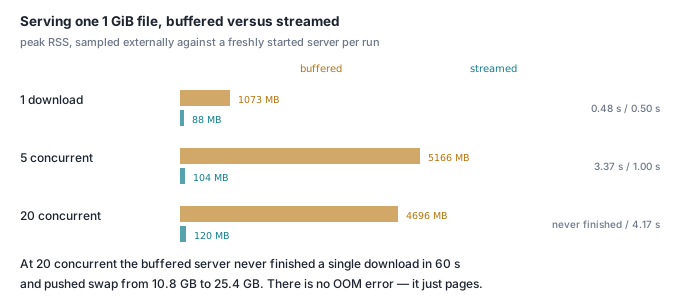
You stream it, and the difference is 88 MB of RAM instead of 1,073 MB for a single 1 GiB download — 104 MB instead of 5,166 MB when five people download at once. At 2 GiB you do not even get the choice: fs.readFile on Node 23 refuses any file of 2,147,483,648 bytes or more with ERR_FS_FILE_TOO_LARGE, and because it throws inside an async handler it takes the whole server process with it.
Hardware: Apple M3, 16 GB, macOS 26.4.1, APFS SSD. Node v23.5.0 arm64, built-ins only, no dependencies and no network. These are indicative figures from one laptop under normal desktop load, not a lab benchmark. Peak RSS is sampled externally with ps -o rss= every 50 ms against a freshly started server per scenario — that restart matters, because RSS does not shrink back after a big allocation, so one buffered run poisons every measurement after it. An idle node server sits at 44 MB, the floor under every number here.
The short answer
- Buffering costs one full copy of the file per concurrent request. One 1 GiB download peaks at 1,073 MB; five peak at 5,166 MB. Streaming the same file peaks at 88 MB and 104 MB. Twenty concurrent streamed downloads peak at 120 MB — 76 MB above idle, for 20 GiB of traffic.
fs.readFilehas a hard ceiling at 2 GiB. The largest file it will return is 2,147,483,647 bytes; one byte more throwsERR_FS_FILE_TOO_LARGE. This is not aBufferlimit —buffer.constants.MAX_LENGTHis 9,007,199,254,740,991 — it is a check insidefsitself.- Streaming does not cost throughput; it buys it. At concurrency 1 the two are a wash (2,054 against 2,150 MB/s). At concurrency 5 streaming is 3.4x faster in wall time (1.00 s against 3.37 s), because the buffered server spends its time allocating instead of sending.
- Backpressure is the subtle one. Against a client that stops reading,
pipe()read only 25.8 MB off disk in 20 s and held 48 MB of RSS. The same handler written asstream.on('data', c => res.write(c))— ignoring the return value — read the entire 1,024 MB into the response's write queue and peaked at 1,078 MB, while the client received zero bytes. pipe()leaks a file descriptor per genuinely aborted download. It stops reading, but never destroys the read stream: five mid-transfer aborts left five descriptors open on the file, still open 60 s later and after a forcedglobal.gc().pipeline()leaked none. The catch when testing it is that a small file on loopback finishes before your timeout fires.
What was measured, and against what
Two generated files: big.bin, 1,073,741,824 bytes of xorshift pseudo-random data (incompressible, standing in for a video or a zip), and big.log, 315,030,195 bytes of realistic log lines. A third file of exactly 2,147,483,648 bytes was generated for the ceiling test and deleted afterwards. The server is node:http with no framework, exposing the same file through several handlers so only the writing strategy changes; clients are curl writing to /dev/null, one process per download.
One caveat on every throughput number: the file is in the OS page cache, so these measure how fast Node moves bytes, not how fast the disk is. Both handlers read the same cached file, so the comparison holds — but do not read 2 GB/s as a claim about your storage.
What does 20 concurrent downloads cost?
The whole article is in this table. Same 1 GiB file, same server, same clients; the only difference is await fs.promises.readFile(F) then res.end(buf) versus pipeline(fs.createReadStream(F), res).
| concurrent downloads | buffered peak RSS | streamed peak RSS | buffered wall | streamed wall |
|---|---|---|---|---|
| 1 | 1,073 MB | 88 MB | 0.48 s | 0.50 s |
| 5 | 5,166 MB | 104 MB | 3.37 s | 1.00 s |
| 20 | 4,696 MB (thrashing) | 120 MB | did not finish in 60 s | 4.17 s |
Concurrency 5 is the clean result: 5,166 MB is 5.04 copies of a 1,024 MB file — exactly what the naive handler promises and exactly what nobody budgets for.
Concurrency 20 is where the failure changes shape. The buffered server does not throw a tidy out-of-memory error — it asks for roughly 20 GiB on a 16 GB machine and macOS starts paging. Swap in use went from 10,775 MB before the run to 25,350 MB after. With a 60-second cap per request:
path=/buffered conc=20 wall=60.10s peakRSS=4696MB
curl:   14 000 28    6 200 28
Fourteen of the twenty requests received no response at all — status 000, curl exit 28, timeout. Six got as far as headers and none finished. The 4,696 MB peak is not the memory the process wanted; it is what the OS kept resident while swapping the rest. Once a process is paging, RSS stops being the interesting number.
The streamed server at the same concurrency moved 20 GiB in 4.17 s and never exceeded 120 MB.
Does 2 GB even work?
No. Not through readFile, at any memory limit.
size=2147483649
  readFileSync      ERR_FS_FILE_TOO_LARGE :: File size (2147483649) is greater than 2 GiB
  promises.readFile ERR_FS_FILE_TOO_LARGE :: File size (2147483649) is greater than 2 GiB
size=2147483648
  readFileSync      ERR_FS_FILE_TOO_LARGE :: File size (2147483648) is greater than 2 GiB
  promises.readFile ERR_FS_FILE_TOO_LARGE :: File size (2147483648) is greater than 2 GiB
size=2147483647
  readFileSync      OK 2147483647
  promises.readFile OK 2147483647
The wall is exactly 2,147,483,647 bytes, and it is a decision inside fs, not a limit of the runtime: buffer.constants.MAX_LENGTH on this build is 9,007,199,254,740,991. Same species as the 512 MB string ceiling that stops JSON.parse — a standard-library guard rail you only meet in production, on the one customer file bigger than everything you tested with.
The failure mode is worse than the error. await fs.promises.readFile(F) in an async handler rejects, nothing catches it, and Node's default unhandled-rejection behaviour terminates the process:
RangeError [ERR_FS_FILE_TOO_LARGE]: File size (2147483648) is greater than 2 GiB
    at readFileHandle (node:internal/fs/promises:538:11)
    at async Server.<anonymous> (.../server.cjs:17:15) {
  code: 'ERR_FS_FILE_TOO_LARGE'
One request for one oversized file kills every download in flight. The streamed handler served the same 2 GiB file in 0.96 s at 88 MB of RSS.
Does streaming cost speed?
At concurrency 1, no. "Streaming is slower" is folklore that survives on the strength of single-user benchmarks: buffered was 0.48 s, streamed 0.50 s.
Under concurrency the ordering reverses hard. Five downloads at once: buffered 3.37 s (1,518 MB/s aggregate), streamed 1.00 s (5,126 MB/s). The buffered server is not slow at sending; it is busy allocating and zeroing five gigabytes.
Three streaming styles, five concurrent 1 GiB downloads:
| implementation | wall | aggregate throughput | peak RSS |
|---|---|---|---|
stream.pipe(res) |
1.00 s | 5,126 MB/s | 104 MB |
await pipeline(stream, res) |
1.05 s | 4,894 MB/s | 116 MB |
Readable.toWeb(stream) |
1.22 s | 4,209 MB/s | 114 MB |
Readable.toWeb is about 18% slower than raw pipe here. It is the right call when you need a ReadableStream for a Fetch-style Response; it is not an upgrade.
What is backpressure, and how do you lose it?
Backpressure is the socket telling the file to slow down. res.write() returns false when the response's internal buffer is over its high-water mark, and the contract is that you stop writing until 'drain'. pipe() and pipeline() honour it by pausing the source. A 'data' handler that ignores the return value does not.
Two clients, same 1 GiB file, 20 seconds each. One is a Python socket that sends the request and never calls recv(). The other drips, reading 64 KB every 100 ms — about 636 KB/s, roughly a phone on a bad train.
| handler | client | bytes read off disk | peak RSS |
|---|---|---|---|
pipe(res) |
stalled, reads nothing | 25.8 MB | 48 MB |
on('data', c => res.write(c)) |
stalled, reads nothing | 1,024 MB | 1,078 MB |
pipe(res) |
drip, 636 KB/s | 13.8 MB | 57 MB |
on('data', c => res.write(c)) |
drip, 636 KB/s | 1,024 MB | 1,078 MB |
The drip rows are the ones to keep. Both clients received the same 12,713,776 bytes in 20 seconds — the slow client is the bottleneck either way, so the extra memory buys the user nothing. It costs the server 19x. With pipe, only 13.8 MB had come off disk. Without it, the whole gigabyte had been read and was sitting in res's write queue, waiting for a socket that needs half an hour to drain it.
This does not reproduce in development, where every client is localhost and reads instantly. One phone on hotel wifi holds a gigabyte hostage; a hundred is an outage.
Never write to a response from a 'data' handler. Use pipeline. If you must generate bytes yourself, check the return value:
async function send(res, chunks) {
  for await (const chunk of chunks) {
    if (!res.write(chunk)) {
      await new Promise(resolve => res.once('drain', resolve));
    }
  }
  res.end();
}
Does the server stop reading when the client leaves?
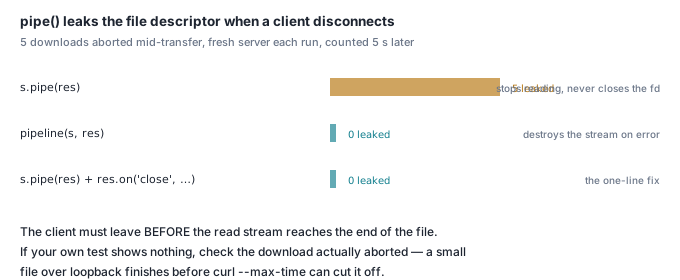
It stops reading, and it never closes the file. A separate rig for this one: 800 MB and 400 MB files, a server whose entire handler is fs.createReadStream(F).pipe(res), five aborted downloads, counted with lsof -p <pid> | grep -c <file> five seconds after the last abort.
  node  87536  sonhoang  17r  REG  1,14  838860800  .../fdtest.bin
  node  87536  sonhoang  18r  REG  1,14  838860800  .../fdtest.bin
  node  87536  sonhoang  19r  REG  1,14  838860800  .../fdtest.bin
  node  87536  sonhoang  20r  REG  1,14  838860800  .../fdtest.bin
  node  87536  sonhoang  21r  REG  1,14  838860800  .../fdtest.bin
count = 5
pipe() does stop reading — the stream is left paused and the byte counter freezes, so no disk bandwidth is wasted. But it never destroys the source, so the descriptor stays open: still open after 60 seconds and after a forced global.gc(). Five more aborts against a pipeline() handler added zero.
The condition is that the client must leave before the read stream reaches the end of the file — the easiest thing to get wrong when testing this, because over loopback the server is faster than your timeout:
| file | abort method | did it abort? | pipe |
pipeline |
|---|---|---|---|---|
| 400 MB | curl --max-time 0.3 |
no — completed | 0 | 0 |
| 400 MB | curl --limit-rate 2M --max-time 1.5 |
yes | 5 | 0 |
| 400 MB | node client, req.destroy() after 2 MB |
yes | 5 | 0 |
| 800 MB | curl --max-time 0.3 |
yes | 5 | 0 |
| 800 MB | curl --limit-rate 2M --max-time 1.5 |
yes | 5 | 0 |
The first row is the trap. curl --max-time 0.3 against 400 MB on loopback finishes rather than aborting:
downloaded=419430400 of 419430400 exit=0 code=200
The same command against 800 MB returns exit=28 with 450 MB of 838 MB, and leaks five descriptors. If your own test shows nothing, check that the client actually disconnected mid-transfer before concluding pipe is safe.
What does not change the result: omitting Content-Length, sending Connection: close, or holding the stream in a metrics map all leak identically. What fixes it is destroying the source — pipeline() in either form, or one explicit line:
const s = fs.createReadStream(FILE);
res.on('close', () => s.destroy());   // or just use pipeline()
s.pipe(res);
The handler that ignores backpressure fails the opposite way: after the client has gone it drains the rest of the file off disk at full speed, then closes cleanly. Wasted I/O, no permanent leak.
Cancelled downloads are exactly the traffic pattern that produces the leak — a video seek, a user hitting stop, a phone losing signal. The same reasoning applies to the sockets you leave open at shutdown — see what a graceful shutdown actually has to close.
How do you make downloads resumable?
Advertise Accept-Ranges: bytes and answer Range with 206 plus a Content-Range. About twenty lines — createReadStream(F, {start, end}) does the seeking.
const m = /^bytes=(\d*)-(\d*)$/.exec(req.headers.range);
let start, end;
if (m[1] === '') { start = SIZE - Number(m[2]); end = SIZE - 1; }  // bytes=-500
else { start = Number(m[1]); end = m[2] === '' ? SIZE - 1 : Number(m[2]); }
if (!(start >= 0 && start < SIZE && end >= start)) {
  res.writeHead(416, { 'content-range': `bytes */${SIZE}` });
  return res.end();
}
res.writeHead(206, {
  'content-length': end - start + 1,
  'accept-ranges': 'bytes',
  'content-range': `bytes ${start}-${end}/${SIZE}`,
});
pipeline(fs.createReadStream(FILE, { start, end }), res).catch(() => {});
What curl -C - actually sends, traced against a partial download that had reached 471,752,632 bytes:
=> GET /range HTTP/1.1
   Range: bytes=471752632-

<= HTTP/1.1 206 Partial Content
   content-length: 601989192
   content-range: bytes 471752632-1073741823/1073741824
An open-ended bytes=N-, nothing clever. The resumed file matched the original byte for byte (sha256 6728f0cb…c826837 on both). A suffix request Range: bytes=-500 came back as bytes 1073741324-1073741823/1073741824, and an out-of-range start returned 416 with Content-Range: bytes */1073741824.
What about uploads going the other way?
Same mistake, one extra multiplier. Collecting req into an array of chunks and calling Buffer.concat holds the chunks and the concatenated copy at once:
| upload handler | peak RSS, 1 GiB body |
|---|---|
chunks.push(c) then Buffer.concat(chunks) |
2,120 MB |
await pipeline(req, fs.createWriteStream(dest)) |
80 MB |
2.07x the body size — the doubling is concat allocating the destination before the sources are collectable. Most body parsers do something in this family by default, which is why an upload endpoint with no size limit is a memory-exhaustion vector no matter how careful the download side is.
Is it worth gzipping the download?
For already-compressed formats, no, and the cost is not marginal. The same 1 GiB of incompressible data, plain and through zlib.createGzip() at level 6:
| response | bytes on the wire | wall | server CPU |
|---|---|---|---|
| plain | 1,073,741,824 | 0.48 s | 0.50 s |
| gzip level 6 | 1,074,047,590 | 15.77 s | 16.64 s |
Compression made the response 306 KB larger, took 33x the wall time and 33x the CPU — a core burned per download to send more bytes.
On the 300 MB log file the trade is real: level 6 cut it to 52.2 MB (0.174) for 2.92 s of CPU, level 1 to 60.1 MB (0.200) for 1.27 s. Level 1 gives up 15% of the saving for 57% of the CPU. Peak RSS barely moved (68–83 MB) — gzip streams too.
The rule: compress by content type, never blanket. For the compressible half, we compared algorithms in gzip or Brotli for APIs.
Check it yourself
No dependencies, no network. It generates a 200 MB file in a temp directory, runs both handlers at concurrency 1, 5 and 20 against a fresh server each time, then deletes everything.
#!/bin/bash
set -e
MB=${1:-200}; PORT=55676
D=$(mktemp -d); cd "$D"
node -e 'const fs=require("fs"),n=Number(process.argv[1])*1048576,w=fs.createWriteStream("big.bin");
let s=0x9e3779b9>>>0,d=0;const b=Buffer.allocUnsafe(1<<20);
(function go(){while(d<n){for(let i=0;i<b.length;i+=4){s^=s<<13;s>>>=0;s^=s>>>17;s^=s<<5;s>>>=0;b.writeUInt32LE(s,i);}
d+=b.length;if(!w.write(b))return w.once("drain",go);}w.end();})();' $MB
cat > s.cjs <<'EOF'
const http=require('http'),fs=require('fs'),{pipeline}=require('stream/promises');
const F='big.bin', SIZE=fs.statSync(F).size;
http.createServer(async (q,r)=>{
  r.writeHead(200,{'content-length':SIZE});
  if(q.url==='/buffered') return r.end(await fs.promises.readFile(F));   // whole file in RAM
  await pipeline(fs.createReadStream(F), r).catch(()=>{});               // 64 KB at a time
}).listen(55676,()=>console.log('up'));
EOF
echo "mode        conc   wall   peak RSS"
for MODE in /buffered /stream; do for N in 1 5 20; do
  node s.cjs >/dev/null 2>&1 & SRV=$!
  sleep 1
  ( while kill -0 $SRV 2>/dev/null; do ps -o rss= -p $SRV; sleep 0.05; done ) > rss.txt & SAMP=$!
  T0=$(python3 -c 'import time;print(time.time())')
  PIDS=""; for i in $(seq 1 $N); do curl -s --max-time 60 -o /dev/null localhost:$PORT$MODE & PIDS="$PIDS $!"; done
  wait $PIDS
  T1=$(python3 -c 'import time;print(time.time())')
  kill $SAMP $SRV 2>/dev/null || true; sleep 0.2
  python3 -c 'import sys;print(f"{sys.argv[1]:<11s} {sys.argv[2]:>3s}  {float(sys.argv[4])-float(sys.argv[3]):5.2f}s  {int(sys.argv[5])/1024:6.0f} MB")' \
    "$MODE" "$N" "$T0" "$T1" "$(sort -n rss.txt | tail -1)"
done; done
cd /; rm -rf "$D"
Output on the machine described above:
mode        conc   wall   peak RSS
/buffered     1   0.10s     247 MB
/buffered     5   0.27s    1049 MB
/buffered    20   1.00s    4055 MB
/stream       1   0.15s      78 MB
/stream       5   0.25s      87 MB
/stream      20   0.87s     107 MB
At 200 MB the buffered version still finishes — it just costs 38x the memory at concurrency 20. Multiply the file size by five and the top row stops finishing at all.