Backups you have actually restored
A backup nobody has restored is a hypothesis. Here is a restore drill that runs in under four seconds against a scratch container, compares row counts against the source, and fails loudly when the dump is quietly incomplete.

Restore your dump into a throwaway container and compare row counts against the source, on a schedule. Everything else — format, compression, retention — is secondary to that one habit. The drill below runs in a little over three seconds end to end on a laptop, and exits non-zero when the restore is wrong.
Use pg_dump -Fc, not plain SQL. Not because it is smaller — measured below, it is very slightly larger than gzipped plain SQL — but because pg_restore can list it, restore one table from it, and run in parallel.
The problem
The cron line everybody has:
0 3 * * * pg_dump "$DATABASE_URL" -Fc -f /srv/backups/app-$(date +\%F).dump
It runs every night. The file appears. It is roughly the size you expect. Nobody has ever read one.
That is not a backup. It is a claim about a file, and the claim is only tested on the day it matters.
Why "the dump file exists" proves nothing
Three failures that a healthy-looking file will happily hide. All of these are measured against Postgres 16.15, on a database with 50,000 users and 500,000 orders.
1. psql exits 0 after a restore that destroyed your data
Restoring a plain SQL dump into a database that already has a conflicting users table:
psql -U postgres -d broken -f plain.sql > out.log 2>&1; echo "exit: $?"
exit: 0
Zero. Success. Here is what actually happened:
psql:plain.sql:71:     ERROR:  relation "users" already exists
psql:plain.sql:500123: ERROR:  column "email" of relation "users" does not exist
psql:plain.sql:550154: ERROR:  column "email" named in key does not exist
psql:plain.sql:550184: ERROR:  insert or update on table "orders"
                              violates foreign key constraint "orders_user_id_fkey"
SELECT count(*) FROM users;    -->      0
SELECT count(*) FROM orders;   -->  500000
Half a million orders pointing at a users table with nothing in it, the foreign key never created, and an exit code that says everything is fine. psql is a SQL client. It ran the statements it was given, some failed, and it moved on.
The fix is one flag, and it belongs in every restore command you ever write:
psql -v ON_ERROR_STOP=1 -f plain.sql # exit: 3, stops at line 71
pg_restore is better behaved — it exits 1 when anything failed, even without --exit-on-error — but it still carries on to the end by default. On the same test it logged 13 errors and finished the job. Add --exit-on-error so it stops at the first one instead of half-building a schema.
2. A dump can be complete-looking and empty
pg_dump --exclude-table-data=orders produces a file with the full schema, a plausible size, and no orders in it. It restores with exit code 0. Nothing about the file tells you. Only a row count against the source does.
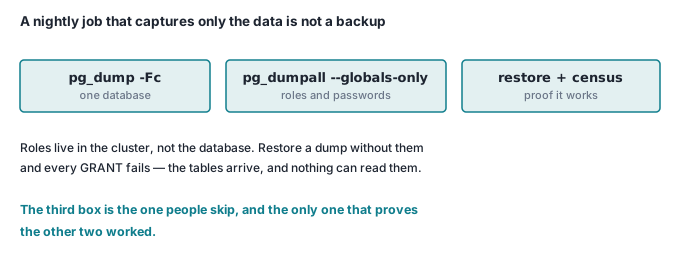
3. pg_dump does not back up your roles
Roles live at the cluster level, not in the database. Restore a dump onto a fresh server and the grants go with them:
pg_restore: error: could not execute query: ERROR:  role "app_ro" does not exist
pg_restore: warning: errors ignored on restore: 2
The tables came back. The read-only role your reporting tool logs in as did not. So the nightly job needs a second line:
pg_dumpall -d "$DATABASE_URL" --globals-only -f /srv/backups/globals-$(date +%F).sql
Note the -d. Unlike pg_dump, pg_dumpall will not take a connection URI as a positional argument — drop it in and you get pg_dumpall: error: too many command-line arguments, exit 1, and no globals file. Easy to copy across from the line above it and not notice for a year.
Read that file once before you file it anywhere. It contains SCRAM password hashes in plain text, so it needs exactly the same protection as the data dump — in practice, more, because people forget it is sensitive.
-Fc versus plain SQL, measured
Same 94 MB database, Postgres 16.15, both dumps taken back to back:
| Command | Output | Bytes |
|---|---|---|
pg_dump -d app -f plain.sql |
plain SQL | 54,117,619 |
gzip -9 plain.sql |
plain SQL, compressed | 7,056,164 |
pg_dump -d app -Fc -f custom.dump |
custom format | 7,098,732 |
The custom-format dump is 42,568 bytes larger than the gzipped plain dump — about 0.6% worse. If you have been choosing -Fc for the file size, that reason does not survive measurement. pg_dump -Fc compresses with gzip internally, so you are comparing gzip against gzip; the archive framing costs a little.
The actual reasons are all things you can only do to a custom-format archive. It has a table of contents:
pg_restore -l custom.dump
;     TOC Entries: 22
;     Compression: gzip
;     Format: CUSTOM
;     Dumped from database version: 16.15
;
218; 1259 16398 TABLE public orders postgres
216; 1259 16386 TABLE public users postgres
3430; 0 16398 TABLE DATA public orders postgres
3428; 0 16386 TABLE DATA public users postgres
3281; 1259 16412 INDEX public orders_placed_at_idx postgres
3283; 2606 16406 FK CONSTRAINT public orders orders_user_id_fkey postgres
You can restore one table out of it, which is what you actually want at 2 a.m. when somebody truncated one table and not the others:
pg_restore -d oneonly --no-owner -t users custom.dump
         List of relations
 Schema | Name  | Type  |  Owner
--------+-------+-------+----------
 public | users | table | postgres

 count
-------
 50000
Watch that one. -t users restored the table and its 50,000 rows and nothing else — \di afterwards reported "Did not find any relations." Indexes, constraints and the unique key are separate TOC entries and were not selected. A single-table restore gives you data, not a working table. Re-create the indexes afterwards, or use -l/-L to select the entries you want by hand.
And it restores in parallel with -j. Our test database is far too small for that to mean anything (0.96 s single-threaded, 0.68 s with -j 4), so treat those as proof the flag works rather than as a benchmark. It matters at sizes where a restore is measured in hours.
The drill
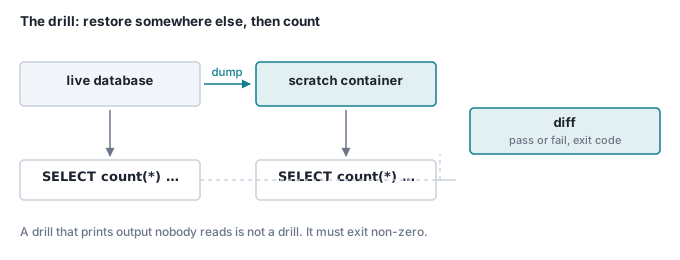
The whole idea is one comparison: count every table in the source, count every table in the restored copy, diff the two lists. Nothing clever.
The census query works on any database without knowing its schema:
SELECT c.relname,
       (xpath('/row/c/text()',
              query_to_xml(format('SELECT count(*) AS c FROM %I.%I', n.nspname, c.relname),
                           false, true, '')))[1]::text::bigint AS rows
FROM pg_class c JOIN pg_namespace n ON n.oid = c.relnamespace
WHERE c.relkind = 'r' AND n.nspname NOT IN ('pg_catalog','information_schema')
ORDER BY 1;
Do not use pg_stat_user_tables.n_live_tup for this. It is an estimate maintained by the statistics collector and it drifts. On our test table, immediately after deleting 50,000 rows:
 relname | n_live_tup
---------+------------
 orders  |     480492

 real_count
------------
     450000
30,492 rows out. Close enough to look right in a dashboard, useless as a verification. Count the rows.
Retention, and why off-site beats frequency
Retention is a filename problem. Dumps named app-YYYY-MM-DD.dump sort chronologically for free, so pruning is sort and comm. Run it under bash, not sh — the process substitutions need it:
KEEP_DAYS=14
ls app-*.dump | sort -r > all.txt
head -n $KEEP_DAYS all.txt > keep.txt
grep -E 'app-[0-9]{4}-[0-9]{2}-01\.dump' all.txt >> keep.txt || true   # the 1st of each month
sort -u keep.txt -o keep.txt
comm -23 <(sort all.txt) <(sort keep.txt) | xargs -r rm --
Run against 120 days of daily dumps, that leaves 17 files — the last fourteen days plus the first of June, July and August. Run against 365, it leaves 26: the same fourteen, plus twelve monthlies. Both figures are from actually running it in a debian:13-slim container, deletions included.
Now the part people get backwards. Hourly dumps sitting on the same disk as the database are worth less than a daily dump on a different machine. Go back through the failures that actually take companies offline — disk dies, host is terminated, provider account is suspended, ransomware encrypts the volume — and every one of them takes the database and every local dump in the same stroke. Increasing the frequency does not change the outcome; it changes how recent the data you also lost was.
So the priority order is:
- A copy on different hardware, in a different account, that the database host cannot delete. Write-only credentials if your object store supports them.
- A restore drill that runs on a schedule and fails loudly.
- Then, and only then, tighter RPO through more frequent dumps or WAL archiving.
Steps 1 and 2 are a weekend. Step 3 without them is theatre.
Check it yourself
Two Postgres 16 containers, a dump, a restore and a verdict. Ports 55503 and 55504 so it collides with nothing.
#!/usr/bin/env bash
set -euo pipefail
SRC=drill-src
DST=drill-dst

docker run -d --name $SRC -e POSTGRES_PASSWORD=demo -p 55503:5432 postgres:16 >/dev/null
docker run -d --name $DST -e POSTGRES_PASSWORD=demo -p 55504:5432 postgres:16 >/dev/null
until docker exec $SRC pg_isready -U postgres >/dev/null 2>&1 \
   && docker exec $DST pg_isready -U postgres >/dev/null 2>&1; do sleep 1; done

# --- something to lose -------------------------------------------------
docker exec -i $SRC psql -U postgres -v ON_ERROR_STOP=1 <<'EOF' >/dev/null
CREATE DATABASE app;
EOF
docker exec -i $SRC psql -U postgres -d app -v ON_ERROR_STOP=1 <<'EOF' >/dev/null
CREATE TABLE users (id bigserial PRIMARY KEY, email text UNIQUE NOT NULL);
CREATE TABLE orders (id bigserial PRIMARY KEY,
                     user_id bigint NOT NULL REFERENCES users(id),
                     total_cents int NOT NULL);
INSERT INTO users (email) SELECT 'u'||g||'@example.com' FROM generate_series(1,10000) g;
INSERT INTO orders (user_id, total_cents)
  SELECT 1+(g%10000), g%9999 FROM generate_series(1,40000) g;
EOF

# --- the census query, run against both --------------------------------
CENSUS="SELECT c.relname,
       (xpath('/row/c/text()',
              query_to_xml(format('SELECT count(*) AS c FROM %I.%I', n.nspname, c.relname),
                           false, true, '')))[1]::text::bigint AS rows
FROM pg_class c JOIN pg_namespace n ON n.oid = c.relnamespace
WHERE c.relkind = 'r' AND n.nspname NOT IN ('pg_catalog','information_schema')
ORDER BY 1;"

# --- dump, ship, restore ----------------------------------------------
docker exec $SRC pg_dump -U postgres -d app -Fc -f /tmp/app.dump
docker cp $SRC:/tmp/app.dump ./app.dump >/dev/null
docker cp ./app.dump $DST:/tmp/app.dump >/dev/null

docker exec $DST psql -U postgres -c 'CREATE DATABASE restore_check;' >/dev/null
docker exec $DST pg_restore -U postgres -d restore_check \
  --no-owner --no-privileges --exit-on-error /tmp/app.dump

# --- verify ------------------------------------------------------------
docker exec $SRC psql -U postgres -d app           -tA -c "$CENSUS" > before.txt
docker exec $DST psql -U postgres -d restore_check -tA -c "$CENSUS" > after.txt

if diff -u before.txt after.txt; then
  echo "RESTORE DRILL PASSED"; cat after.txt
else
  echo "RESTORE DRILL FAILED"; exit 1
fi
RESTORE DRILL PASSED
orders|40000
users|10000

./drill.sh  3.595 total
Now break it. Change the dump line to pg_dump -U postgres -d app --exclude-table-data=orders -Fc — a plausible copy-paste accident — and run it again:
--- before.txt
+++ after.txt
@@ -1,2 +1,2 @@
-orders|40000
+orders|0
 users|10000
RESTORE DRILL FAILED
script exit: 1
pg_restore was perfectly happy. The row count was not. That gap is the entire point of the exercise.
docker rm -f drill-src drill-dst
Point it at a real dump, run it from cron weekly, and alert on the non-zero exit. Then you have a backup rather than a hypothesis.
Where this goes next
This is the verification behind the Postgres that runs Simple CRM and the Workflow Builder — the same database whose data directory we moved onto a path we chose in where your database actually lives. A bind mount changes what can delete your data; the drill changes whether you find out in time.
Earlier in this series: a job queue in Postgres, moving files with only a password prompt, and one Caddyfile for TLS and routing.